Introduction
This article records the process of building a temperature and humidity monitor with an ESP01 + DHT11, covering hardware wiring, code implementation, and functional verification. The ESP01, a low-cost, low-power WiFi module, is well suited as a collection node.
Hardware Preparation
- ESP01 Board: Core control module, responsible for data collection and network communication.
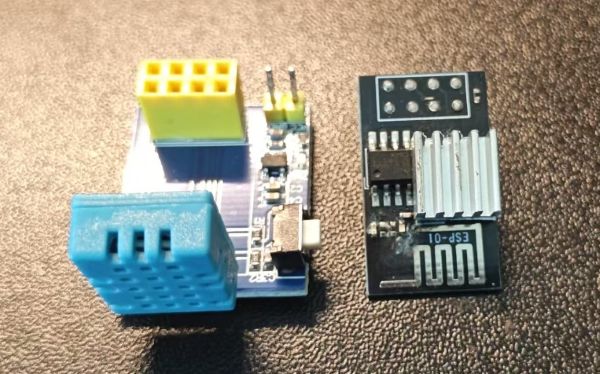
- DHT Temperature and Humidity Sensor: Used to measure ambient temperature and humidity.
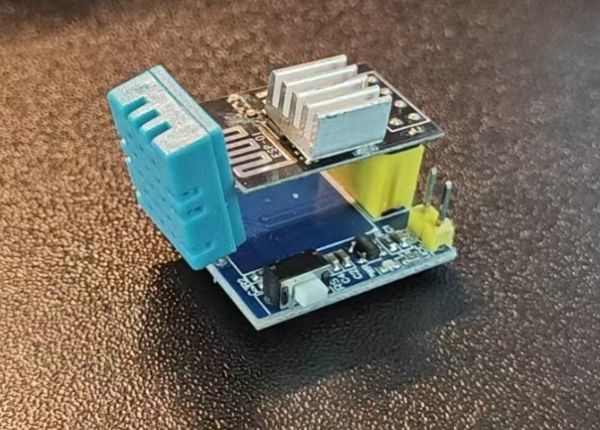
- Dupont Wires: Used to connect the ESP01 and DHT sensor.
Connect the DHT sensor’s VCC pin to the ESP01’s 3.3V pin, the GND pin to GND, and the data pin to the designated pin on the ESP01 (defined as DHTPIN in the code).
Code Implementation
Including Required Libraries
1
2
3
4
5
6
7
8
9
| #include <ESP8266WiFi.h>
#include <WiFiUdp.h>
#include <NTPClient.h>
#include <PubSubClient.h>
#include <ESP8266WebServer.h>
#include <ArduinoJson.h>
#include <DHT.h>
#include "app_config.h"
#include "wifi_config.h"
|
These libraries handle WiFi connectivity, NTP time sync, MQTT communication, Web server, JSON data processing, and DHT sensor reading respectively.
 1
 2
 3
 4
 5
 6
 7
 8
 9
10
11
12
13
14
15
| // Create a UDP object for NTP client
WiFiUDP ntpUDP;
NTPClient timeClient(ntpUDP, ntpserver, 8 * 3600, 60000);
// Create WiFi and MQTT client objects
WiFiClient espClient;
PubSubClient client(espClient);
uint32_t delayMS;
unsigned long globalPreviousMillis = millis();
unsigned long globalCurrentMillis = millis();
String readings;
DHT dht(DHTPIN, DHTTYPE);
ESP8266WebServer server(80);
|
This initializes the NTP client, WiFi client, MQTT client, DHT sensor object, and Web server object.
Reconnecting to MQTT Server
 1
 2
 3
 4
 5
 6
 7
 8
 9
10
11
12
13
14
15
16
17
18
19
20
21
22
23
24
25
26
27
| void reconnect() {
unsigned long previousMillis = millis();
unsigned long rebootMillis = millis();
while (!client.connected()) {
unsigned long currentMillis = millis();
if (currentMillis - previousMillis >= 1500) {
if (currentMillis - rebootMillis >= 5000) {
Serial.println("exit to try.");
break;
}
previousMillis = currentMillis;
}
Serial.print("Attempting MQTT connection...");
// Generate a random client ID
String clientId = "ESP32Client-";
clientId += String(WiFi.macAddress());
Serial.print(clientId.c_str());
if (client.connect(clientId.c_str())) {
Serial.println(" ... connected");
} else {
Serial.print(" ... failed, rc=");
Serial.print(client.state());
Serial.println(" try again in 1 seconds");
delay(1000);
}
}
}
|
This function attempts to reconnect when the MQTT connection is lost, with retry timing and exit conditions.
Getting Sensor Data and Publishing to MQTT
 1
 2
 3
 4
 5
 6
 7
 8
 9
10
11
12
13
14
15
16
17
18
19
20
21
22
23
24
25
26
27
28
29
30
31
32
33
34
35
36
37
38
39
40
41
42
43
44
45
46
| String getReadingsSensor () {
// Create a dynamically allocated JSON document
DynamicJsonDocument sensordoc(1024);
JsonObject info = sensordoc.createNestedObject("info");
timeClient.update();
int epochTimel =timeClient.getEpochTime();
info["board_type"] = boardType;
info["ip"] = WiFi.localIP().toString();
info["mac"] = WiFi.macAddress();
info["utc"] = epochTimel;
info["name"] = nodeName;
JsonObject sensor = sensordoc.createNestedObject("sensor");
JsonObject sensorTemp = sensor.createNestedObject("ths");
sensorTemp["name"] = dhtName;
float humidity = dht.readHumidity();
float temperature = dht.readTemperature();
float fahrenheit = dht.readTemperature(true);
if (isnan(humidity) || isnan(temperature) || isnan(fahrenheit)) {
Serial.println(F("Failed to read from DHT sensor!"));
} else {
float hif = dht.computeHeatIndex(fahrenheit, humidity);
float hic = dht.computeHeatIndex(temperature, humidity, false);
Serial.print(F("Humidity: "));
Serial.print(humidity);
Serial.print(F("% Temperature: "));
Serial.print(temperature);
Serial.print(F("°C "));
Serial.print(fahrenheit);
Serial.print(F("°F Heat index: "));
Serial.print(hic);
Serial.print(F("°C "));
Serial.print(hif);
Serial.println(F("°F"));
sensorTemp["temperature"] = temperature;
sensorTemp["humidity"] = humidity;
sensorTemp["fahrenheit"] = fahrenheit;
}
serializeJson(sensordoc, readings);
// Publish data to MQTT topic
client.publish("sensor/data", readings.c_str());
return readings;
}
|
This function reads temperature and humidity data from the DHT sensor, packages it in JSON format, and publishes it to the specified MQTT topic.
Handling API Requests
1
2
3
4
5
6
7
8
| void handleAPI() {
String result;
result += "#Esp-01 API \n";
String msg = getReadingsSensor();
result += msg + "\n";
server.sendHeader("Cache-Control", "no-cache");
server.send(200, "application/json; charset=utf-8", result);
}
|
This function handles HTTP GET requests to /api/sensor, returning sensor data in JSON format.
Initialization Setup
 1
 2
 3
 4
 5
 6
 7
 8
 9
10
11
12
13
14
15
16
17
18
19
20
21
22
23
24
25
26
27
28
29
30
31
32
33
34
35
36
37
38
39
40
41
42
43
44
| void setup() {
Serial.begin(115200);
dht.begin();
lastConnectTime = millis();
WiFi.mode(WIFI_STA);
WiFi.begin(ssid, password);
unsigned long previousMillis = millis();
unsigned long rebootMillis = millis();
while (WiFi.status() != WL_CONNECTED) {
unsigned long currentMillis = millis();
if (currentMillis - previousMillis >= 15000) {
if (currentMillis - rebootMillis >= 50000) {
Serial.println("reboot now.");
ESP.restart();
}
Serial.println("retry now.");
WiFi.disconnect();
WiFi.reconnect();
previousMillis = currentMillis;
}
delay(500);
Serial.print(".");
}
Serial.println("");
Serial.print("Connected to ");
Serial.println(ssid);
Serial.print("IP address: ");
Serial.println(WiFi.localIP());
server.on(F("/"), []() {
server.send(200, "text/plain", "hello from esp32!");
});
delayMS = 15000;
client.setServer(mqttServer, mqttPort);
client.setKeepAlive(60); // Set keepalive interval to 60 seconds
client.setBufferSize(2048);
server.on("/api/sensor", HTTP_GET, handleAPI);
server.begin();
Serial.println("HTTP server started");
globalPreviousMillis = millis();
globalCurrentMillis = millis();
getReadingsSensor();
}
|
The setup function handles serial initialization, DHT sensor initialization, WiFi connection, MQTT server configuration, and Web server startup.
Main Loop
 1
 2
 3
 4
 5
 6
 7
 8
 9
10
11
12
13
14
15
16
17
18
19
20
| void loop() {
server.handleClient();
WiFiStatusHandle();
globalCurrentMillis = millis();
if (globalCurrentMillis - globalPreviousMillis >= delayMS) {
if (!client.connected()) {
reconnect();
}
client.loop();
// Assume this is data read from the sensor
getReadingsSensor();
// Publish data to MQTT topic
//client.publish("sensor/data", readings.c_str());
Serial.println(client.state());
Serial.println(client.getBufferSize());
Serial.println(client.getWriteError());
globalPreviousMillis = globalCurrentMillis;
}
delay(200); //allow the cpu to switch to other tasks
}
|
The loop function continuously processes Web server requests, checks WiFi status, and periodically reads sensor data and publishes to the MQTT server.
Functional Analysis
Temperature and Humidity Data Collection
Reads ambient temperature and humidity data through the DHT sensor, and calculates Fahrenheit temperature and heat index.
Network Communication
- WiFi Connection: The ESP01 connects to the specified WiFi network and obtains an IP address.
- MQTT Communication: Packages collected temperature and humidity data in JSON format and publishes it to a specified topic via the MQTT protocol.
- Web Server: Provides a simple Web server that handles HTTP GET requests to
/api/sensor, returning sensor data.
Error Handling and Reconnection Mechanism
When WiFi connection fails or MQTT connection is lost, it attempts reconnection with a timeout restart mechanism to ensure system stability.
Summary
The steps above complete the ESP01 + DHT11 temperature and humidity monitor: the system periodically collects temperature and humidity data, reports it to a server via MQTT, and exposes a simple Web API for external access.