MiBeeNvr v0.3.0: One-Click Xiaomi Camera Integration, Recordings Never Lost
Got Xiaomi cameras at home? Want to keep your recordings on your own storage instead of relying on the cloud?
As someone with several Xiaomi cameras at home, I always had one frustration: every time I wanted to check the footage from my doorbell camera, I had to log into Xiaomi Cloud, wait for ages while it loaded, and it would often just spin. Plus, cloud storage charges by the day — it adds up over the month. And if you swap cameras, all your old recordings are gone. Pretty frustrating.
MiBeeNvr was built to solve these exact problems. It’s a completely free, open-source tool that lets your Xiaomi camera recordings live directly on your own computer or NAS, with no cloud dependency. Watch them however you want.
Xiaomi Cameras, Natively Supported
3 easy steps:
- Open the MiBeeNvr web page → Log in with your Xiaomi account → All your cameras are listed
- Click “Add” → Recording starts automatically, it’s that simple
- Open the web page anytime → Watch live footage or replay past recordings
Here’s what the interface looks like:

Which cameras are compatible? Pretty much all of them:
- Xiaomi Smart Camera series
- Xiaomi Doorbell
- Xiaomi Baby Monitor
The configuration is minimal:
| |
The best part: no extra Docker containers needed for protocol conversion — everything is built into a single application.
Archiving Recordings — Remove the Camera, Keep the Footage
The door camera I installed last year — I want to upgrade it. But the past few months of recordings are still useful, and I don’t want to lose them. Before, there was no solution — delete the camera, and the recordings go with it.
Now, MiBeeNvr’s archiving feature makes everything simple:
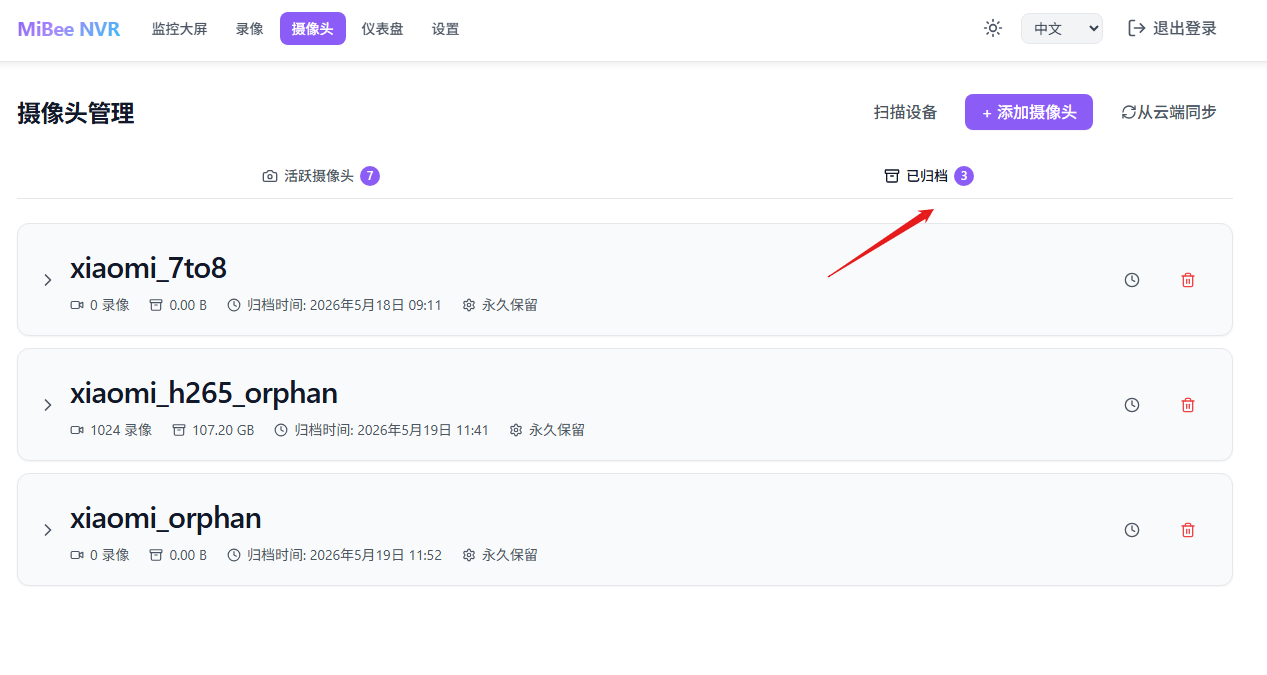
Click “Archive” → Type “DELETE” to confirm → Camera is removed, but recordings remain intact.
What can you do with archived recordings? Play them, download them, delete individual ones, and set how long to keep them. Fully under your control.
The difference between regular deletion vs archiving:
| Action | Camera | Recordings |
|---|---|---|
| Direct Delete | Removed | All deleted |
| Archive | Removed | Permanently retained |
Archived camera interface:
Why MiBeeNvr
Completely free and open source — not a penny to spend. Data stays in your hands — privacy is guaranteed. No cloud dependency — stable and reliable, no risk of vendor shutdown. Single binary file — download and run. Docker one-click deployment — even beginners can handle it. Web interface — no need to memorize command lines.
After trying all the options, I found that this kind of simple, practical tool is the most reliable.
Quick Start
Deployment takes just one command:
| |
Open your browser to http://your-ip:9090, do a quick setup on first use, and you’re ready to add cameras.
Want the technical details? Check out the v0.3.0 Tech Post
Haven’t tried MiBeeNvr yet? Start with the MiBeeNvr Introduction
Open Source
GitHub: https://github.com/Mi-Bee-Studio/MiBeeNvr Gitee: https://gitee.com/Mi-Bee-Studio/MiBeeNvr
Give it a try — maybe your Xiaomi cameras can be this easy to manage too.