MiBeeNvr v0.3.1: Multi-Protocol Streaming and Native Xiaomi Camera Support
#XQ|A lot of work went into the releases after v0.2.0. v0.3.x brings several major updates: native Xiaomi camera support, recording archiving, multi-protocol streaming architecture (WebRTC/HTTP-FLV/RTMP/SRT/LL-HLS), and a wave of security hardening. The architectural evolution from external dependencies to built-in implementation, from single protocol to full protocol support, was much more complex than I expected.
The previous post introduced v0.2.0’s 15 new features (v0.2.0 Update). If you haven’t read the first post, start with MiBeeNvr Introduction. v0.3.0 focuses on deep Xiaomi camera integration, and v0.3.1 builds on that with a complete multi-protocol streaming architecture. For the full changelog, see GitHub Release Notes.
Architecture Evolution: From External Dependencies to Built-in Implementation
The development of Xiaomi camera support was one of the most interesting architecture experiments I’ve done. The entire process went through three distinct phases, each with its own unique lessons.
Phase 1: go2rtc External Dependency (v0.1.0 Era)
Early MiBeeNvr relied entirely on go2rtc for Xiaomi camera protocol conversion:
graph TB
    subgraph "Xiaomi Camera"
        MX[Camera]
    end

    subgraph "External Container"
        VV[go2rtc]
    end

    subgraph "MiBeeNvr"
        ZQ[RTSP Client]
        PM[HLS Encoding]
        BT[Storage Management]
    end

    MX -->|"miss protocol"| VV
    VV -->|"RTSP"| ZQ
    ZQ -->|HLS| PM
    PM -->|Storage| BT

    classDef hardware fill:#e3f2fd,stroke:#1976d2
    classDef process fill:#e8f5e9,stroke:#4caf50
    classDef storage fill:#fff3e0,stroke:#ff9800
    classDef network fill:#f3e5f5,stroke:#9c27b0

    class MX hardware
    class VV process
    class ZQ,PM,BT storage
Honestly, this approach seemed elegant at first: use a ready-made Docker container for protocol conversion, while the main application focuses on NVR functionality. But problems quickly emerged:
- CS2 P2P connection instability: Xiaomi camera P2P connections would timeout and freeze after about 20 minutes
- Difficult debugging: go2rtc is a separate project — hard to locate issues
- Complex operations: Managing two Docker containers meant constant port conflicts and resource contention
Bottom line: making a core function dependent on an external container was fundamentally a design mistake.
Phase 2: Plugin Architecture Experiment (Between v0.2.0 and v0.3.0)
After learning my lesson, I decided to port go2rtc’s Xiaomi code into MiBeeNvr as a plugin system. The idea sounded good:
- Interface-based registration for protocol decoupling
init()-based plugin mechanism- Even experimented with gRPC process isolation
Sounds great, right? Making the architecture extensible, sacrificing a bit of performance for development convenience. But reality hit hard:
flowchart LR
    subgraph "Xiaomi Camera"
        MX[Camera]
    end

    subgraph "Plugin Process"
        JJ[Plugin Process]
        JR[gRPC Communication]
    end

    subgraph "MiBeeNvr Main Process"
        NT[Main NVR Engine]
        RJ[HLS Encoding]
        JN[Storage Management]
    end

    MX -->|"miss protocol"| JJ
    JJ -->|gRPC| JR
    JR -->|Processing| NT
    NT -->|HLS| RJ
    RJ -->|Storage| JN

    classDef hardware fill:#e3f2fd,stroke:#1976d2
    classDef process fill:#e8f5e9,stroke:#4caf50
    classDef storage fill:#fff3e0,stroke:#ff9800
    classDef network fill:#f3e5f5,stroke:#9c27b0

    class MX hardware
    class JJ,JR process
    class NT,RJ,JN storage
Problems found in actual use:
- Overly complex architecture: Real-time preview gained multiple intermediate layers, significantly degrading performance
- Increased resource consumption: Extra processes and communication overhead
- High barrier for newcomers: The codebase became hard to understand — a simple feature required cross-process communication
#QN|After the struggle, I found that sometimes the simplest solution is the best.
Phase 3: Back to Simplicity (v0.3.0)
In v0.3.0, I completely removed the plugin system and migrated the Xiaomi code to the built-in internal/xiaomi/ package:
graph TB
    subgraph "Xiaomi Camera"
        MX[Camera]
    end

    subgraph "MiBeeNvr Core"
        HJ[internal/xiaomi/ package]
        TZ[Core NVR Engine]
        PM[HLS Encoding]
        BT[Storage Management]
    end

    MX -->|"miss protocol"| HJ
    HJ -->|Direct processing| TZ
    TZ -->|HLS| PM
    PM -->|Storage| BT

    classDef hardware fill:#e3f2fd,stroke:#1976d2
    classDef process fill:#e8f5e9,stroke:#4caf50
    classDef storage fill:#fff3e0,stroke:#ff9800

    class MX hardware
    class HJ,TZ,PM,BT process
As the Release Notes say:
“Plugin System Removed — Xiaomi migrated from gRPC plugin to built-in internal/xiaomi/ package”
“Full Xiaomi IP camera integration — no plugins, no external dependencies”
Now the architecture is a single binary, no external processes, no Docker dependency. Sometimes, for a project at this stage, simplicity matters more than extensibility.
Xiaomi Camera Feature Details
Built-in CS2 P2P Protocol
MiBeeNvr now directly supports Xiaomi camera CS2 P2P protocol — no need for go2rtc as intermediary.
Cloud Authentication Flow
The complete authentication flow includes:
- Login with Xiaomi account
- Obtain passToken
- Auto-discover device list
- Establish direct connection
Supported device types:
.camera.— Standard cameras.cateye.— Doorbell cameras.feeder.— Pet feeders (HLC8 model)
Configuration Example
Add Xiaomi camera configuration in mibeenvr.yaml:
| |
Web Interface
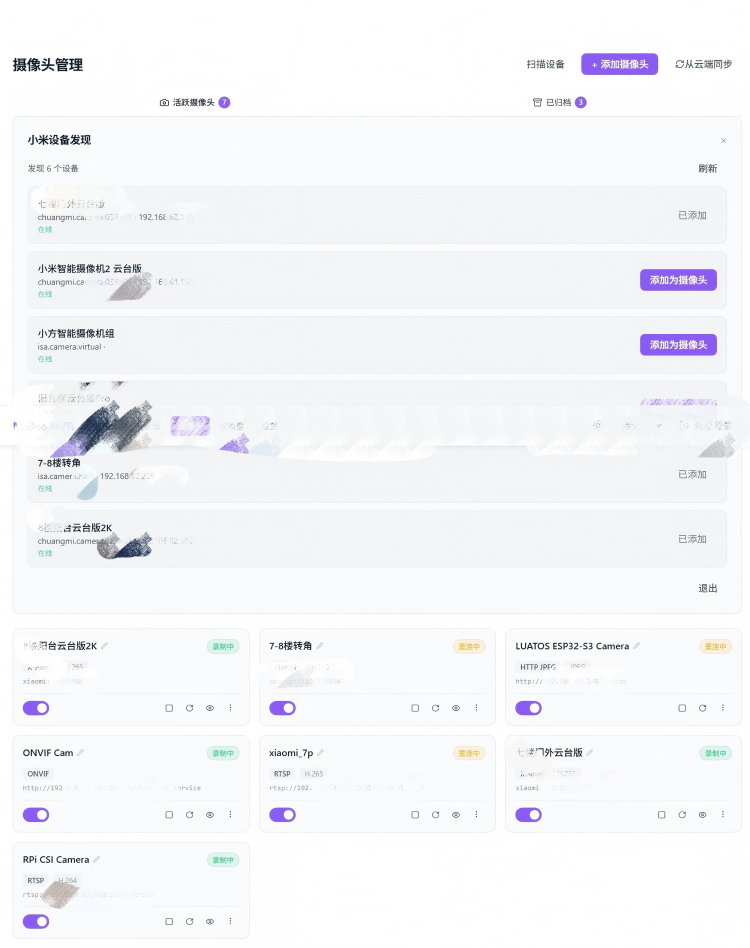
The Web interface provides complete account management:
- Xiaomi account login page
- Auto-discover cameras
- One-click add functionality
Honestly, the authentication flow was more complex than I expected, but the final user experience turned out decent.
Here’s the actual interface:
Recording Archiving: A Unique Camera Management Approach
Recording archiving is a highlight of v0.3.0. The use case is simple: when you need to remove a camera (broken, moving, upgrading) but want to keep historical recordings, traditional NVR systems typically delete all related data.
MiBeeNvr offers a more user-friendly solution:
flowchart LR
    HJ[Active Camera] --> BM[Stop Recording]
    BM --> MK[Merge Segments]
    MK --> BW[Mark Archived]
    BW --> TR[Remove from Config]
    TR --> F[Recordings Retained]

    classDef process fill:#e8f5e9,stroke:#4caf50
    classDef storage fill:#fff3e0,stroke:#ff9800
    classDef network fill:#f3e5f5,stroke:#9c27b0

    class HJ,BM,MK,TR process
    class BW,F storage
Three-State Camera Management
Cameras now have three states:
- Active — Currently recording
- Disabled — Paused
- Archived — Read-only (historical record)
Archive Flow
The archive operation is intuitive:
- Click “Archive” on the camera list
- Confirmation dialog appears
- Type “DELETE” to confirm
- System auto-merges segments and marks as archived
- Camera removed from live list, but recordings fully retained
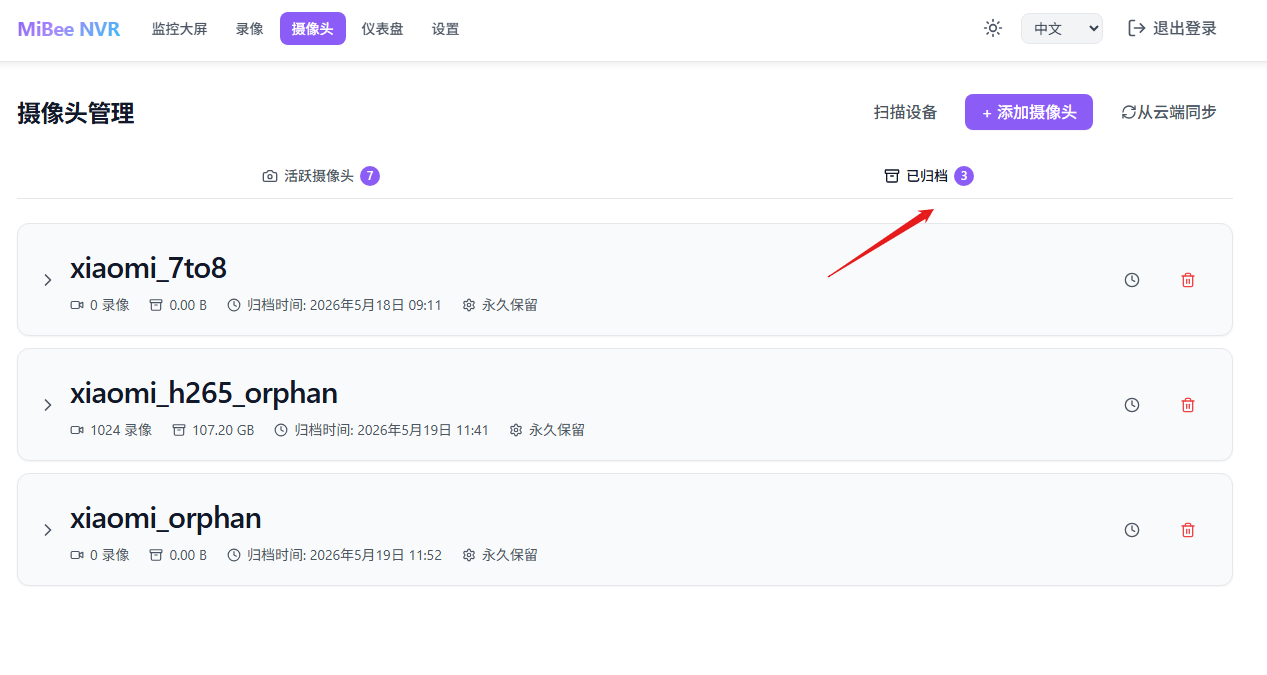
Post-Archive Management
Archived recordings support:
- Playback of historical recordings
- Download individual recording files
- Delete specific recordings
- Set archive retention period
The actual interface:
Honestly, this is the feature I wanted most when using other NVR systems. Most systems just delete everything when you remove a camera, with no concept of preserving historical data.
Multi-Protocol Streaming: From HLS to Full Protocol Support
v0.3.1’s most significant change is the introduction of a complete multi-protocol streaming architecture. v0.3.0 only had HLS as a playback protocol, with 5-15 second latency — not great for real-time monitoring. This update adds 5 protocols, with latency as low as sub-second.
StreamHub Multi-Consumer Fanout
The core architectural change is the introduction of StreamHub — a multi-consumer frame distributor. Previously, each camera stream could only connect to one consumer (HLS encoder). Now it can fan out to multiple protocol outputs simultaneously:
flowchart LR
    BR[Camera Source] --> QN[StreamHub]
    QN --> C[HLS]
    QN --> D[WebRTC]
    QN --> E[HTTP-FLV]
    QN --> F[RTMP]
    QN --> G[SRT]

    classDef input fill:#E3F2FD,stroke:#1565C0,color:#1565C0
    classDef hub fill:#FFF3E0,stroke:#E65100,color:#BF360C
    classDef output fill:#E8F5E9,stroke:#2E7D32,color:#1B5E20

    class BR input
    class QN hub
    class C,D,E,F,G output
StreamHub’s design is simple: each recorder broadcasts frames to StreamHub, and consumers (HLS/WebRTC/FLV managers) subscribe to their interested streams. Adding a new protocol only requires implementing a new consumer — no changes to the recorder code.
Protocol Comparison
Five protocols, each with different use cases:
| Protocol | Latency | Codec | Direction | Use Case |
|---|---|---|---|---|
| WebRTC (WHEP) | <1s | H.264 | Pull | Real-time preview, intercom |
| HTTP-FLV | 1-3s | H.264/H.265 | Pull | Web low-latency monitoring |
| LL-HLS | 2-5s | H.264/H.265 | Pull | Low-latency compatible solution |
| HLS | 5-15s | H.264/H.265 | Pull | Maximum compatibility |
| RTMP | — | H.264 | Push | OBS and other push tools |
| SRT | — | H.264 | Push | Remote/unstable network push |
Protocol Switcher
The frontend adds a ProtocolSwitcher component. Users can switch protocols with one click from the playback interface. The dropdown shows currently available protocols with estimated latency. H.265 cameras automatically exclude unsupported protocols (like WebRTC).
WebRTC WHEP Implementation
WebRTC is implemented via the WHEP (WebRTC-HTTP Egress Protocol) standard, using pion/webrtc v4 on the backend:
- Max 2 peers per H.264 camera
- Auto-eviction on idle timeout
- SDP audio rejection (video-only scenario)
- Zombie connection detection + auto-reconnect
Honestly, WebRTC signaling exchange was much simpler than I thought — the WHEP protocol reduces SDP exchange to a single POST request.
RTMP Push and SRT Receive
#YT|Beyond pull protocol rich, v0.3.1 also adds push stream capabilities:
- RTMP: Implemented via gortmplib, supports stream key authentication, H.264 streams enter StreamHub directly
- SRT: Implemented via gosrt, MPEG-TS demux extracts H.264 NALUs and feeds them into StreamHub
This means you can push from OBS to MiBeeNvr, or use SRT to remotely push video streams over unstable networks.
Setup Wizard: First-Run Experience
v0.3.1 adds a Setup Wizard that automatically enters configuration mode on first launch:
- Auto-detect browser-supported streaming protocols
- Recommend best protocol (priority: LL-HLS > WebRTC > HTTP-FLV > HLS)
- Set admin password
- Create initial configuration
This fixes a pain point from v0.3.0: the initialization page wouldn’t auto-display in Docker deployments — you’d have to try logging in first before the redirect. Now the /api/health endpoint includes a setup_required field, and the frontend proactively detects uninitialized state and auto-navigates to #/setup.
v0.3.1 UX Improvements
Dashboard Multi-Protocol Support
The dashboard grid now supports multi-protocol playback. Each camera cell shows a protocol badge in the top-right corner, color-coded by protocol: WebRTC green, FLV orange, HLS blue, JPEG gray. The default protocol is configured in settings, auto-downgrading to HLS → JPEG when unavailable.
Settings Page Restructured
The settings page is split into General and Advanced tabs:
- General: Cleanup policy, frontend preferences, default protocol selection, protocol guide
- Advanced: Merge policy, WebDAV, streaming config (WebRTC/FLV/RTMP/SRT), Feature Toggles
Previously all settings were piled on one page — now it’s much better organized.
Camera Brand Compatibility Guide
Added 20+ camera brand compatibility documentation, including RTSP URL examples and configuration methods for Hikvision, Dahua, Uniview, Axis, TP-Link, Xiaomi, and others.
v0.3.0 + v0.3.1 Highlights
Security Hardening (v0.3.0)
v0.3.0 includes 15+ security fixes:
- Enhanced path validation
- Hardened authentication mechanism
- Rate limiting optimization
- Security header settings
- SQL injection protection
Complete Frontend Upgrade (v0.3.0)
The frontend completed a full Svelte 5 migration:
- Runes syntax
- Removed all legacy syntax
- 500+ i18n key-value pairs
HLS Improvements (v0.3.0)
HLS player optimizations:
- Exponential backoff auto-retry
- Zombie player detection
- Sub-stream fallback support
v0.3.1 Bug Fixes
- Docker init page fix: Added
setup_requiredfield to health endpoint, proactive detection and redirect - LL-HLS priority correction: Protocol recommendation order changed to LL-HLS > WebRTC > HTTP-FLV > HLS
- Xiaomi camera PTS fix: PTS baseline being reset on reconnection causing HLS timestamp restart — moved to
Start()to set only once - ONVIF error propagation: Errors no longer silently swallowed; returning structured error info (NETWORK/TIMEOUT/NO_DEVICES/PARSE_ERROR)
- WebRTC zombie detection: Null check fix for rapid mount/unmount of dashboard grid cells
- Stats chart unit: Fixed threshold offset issue where GB-level data was displayed as MB
Summary + Open Source
From v0.2.0 to v0.3.1, a total of 160+ commits. v0.3.0 brought native Xiaomi camera support and recording archiving (141 commits, 45 features, 48 fixes). v0.3.1 built on that with a complete multi-protocol streaming architecture (WebRTC/HTTP-FLV/RTMP/SRT/LL-HLS), Setup Wizard, and a series of UX improvements.
From external dependencies to plugin experimentation, then back to built-in simplicity; from single-protocol HLS to StreamHub fan-out with full protocol support. These two architecture evolutions taught me a profound lesson:
Sometimes, the most “correct” architecture isn’t the most flexible one. But for streaming media, protocol extensibility is indeed necessary.
Open source:
#ZN|After all this struggle — from Xiaomi cameras to full-protocol streaming — MiBeeNvr has finally evolved from a simple NVR into a more general-purpose video streaming platform. If you’re also tinkering with smart home tech or need a lightweight NVR solution, give it a try.