Zhi Theme v0.2.0: Language Switcher + Post Series + Mermaid Upgrade
Zhi theme v0.2.0 is out — the most significant feature update since the initial release back in April. This release addresses real needs accumulated from personal usage and iterative development.
In a nutshell:
- Language switcher: Globe icon button with CSS dropdown, auto-linking translated pages
- Post Series: Series overview page (card layout) + detail page (stepper/timeline layout) with sort toggle
- Mermaid v11+: Async render API with reliable dark mode adaptation
- Plus a slew of bug fixes and comprehensive documentation updates
Let’s walk through each feature.
Multilingual / i18n Support
The Problem
This blog has always been bilingual (Chinese + English), relying on Hugo’s built-in multilingual mechanism: each post has .md (Chinese) and .en.md (English) files, with URLs automatically routed under /zh/ and /en/. The mechanism works well, but there was a critical missing piece — readers had no way to find the language switch.
Hugo’s multilingual support is excellent, but the theme needs to implement the switching UI. Most Hugo themes provide a simple dropdown selector, but this blog has some additional constraints:
- Series use different taxonomy names per language — Chinese “eBPF 系列” vs English “eBPF Series”
- Archive page slugs differ across languages
- Language switching should keep the reader on the current page, not bounce back to the homepage
The Implementation
v0.2.0 adds a globe icon button in the header. Clicking it opens a CSS dropdown menu listing all translated versions of the current page.

The core implementation leverages Hugo’s native .Page.Translations method — it automatically finds pages with matching slugs across languages. For edge cases like series taxonomy pages, the theme does additional processing: it reverse-links series terms across languages through the article’s translation chain.
Usage is straightforward — just configure 2+ languages in your site config and the button appears automatically. The theme ships with en.toml and zh-cn.toml translation files covering all UI elements: header, sidebar, footer, reading progress, and more.
The language switcher handles edge cases correctly: current language is hidden from the menu, single-language sites don’t show the button, and it’s fully keyboard accessible.
Post Series (Series Taxonomy)
Why Series?
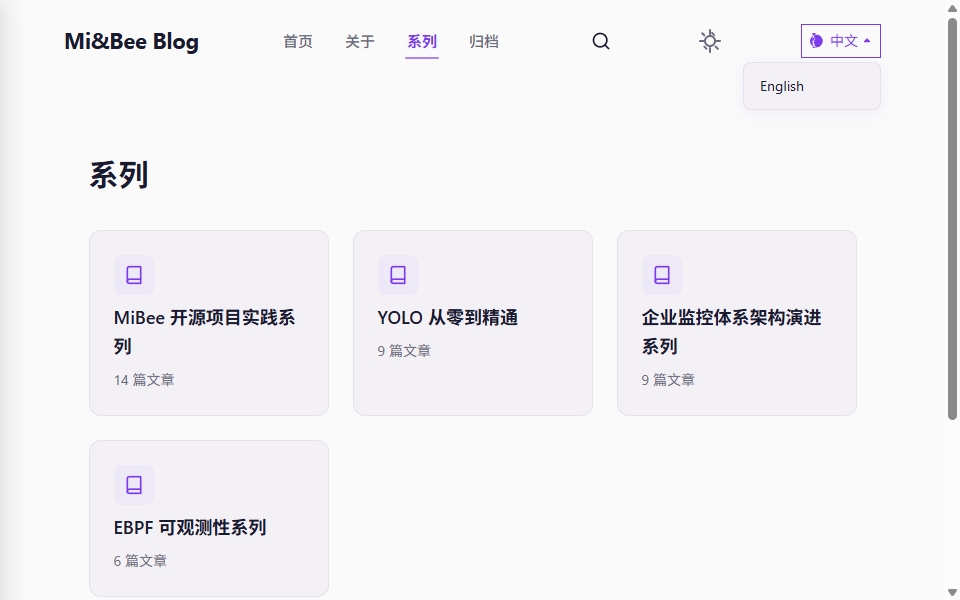
Some blog topics span multiple categories. For example, the “eBPF Series” has 7 articles spread across both the “Observability” and “Architecture” categories. Categories and tags alone can’t help readers follow a series in order.
Hugo has supported custom taxonomies since v0.90, so series as a taxonomy was theoretically possible. But it needs full theme-side UI support to be truly useful.
Series Overview Page
/series/ renders all series as cards. Each card shows a cover image, series name, and article count.
Series Detail Page
Clicking any series takes you to the detail page with a stepper/timeline layout — each post appears as a step node with number, title, and summary.

Posts are sorted by weight in descending order by default (latest first), giving new readers a quick overview. A sort toggle button at the top-right switches to ascending order (reading order). The user’s preference is persisted in localStorage — next time you visit the same series, it remembers your choice.
At the bottom of each article, “Previous/Next” navigation links let you read through the series in order.
How to Use
Add series and weight to your article’s front matter:
| |
weight controls ordering within the series. Using weight instead of date allows inserting new articles in the middle without changing dates of existing ones. Want to add an article between #3 and #4? Just set its weight to 3.5.
For bilingual series naming: Chinese posts use Chinese series names, English posts use English series names. Hugo treats them as separate taxonomy terms, each showing articles in the correct language. The theme automatically links them through the article translation chain.
Mermaid v11+ Upgrade
This blog uses Mermaid extensively for architecture diagrams (example post).
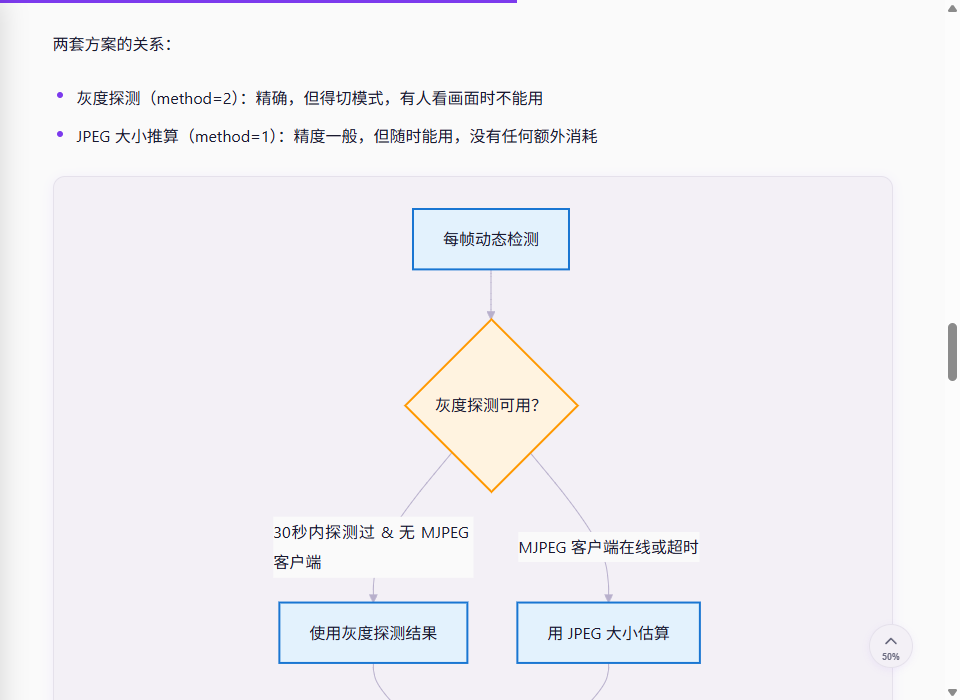
v0.2.0 upgrade highlights:
- Async render API: Switched from the old synchronous
init()to the newmermaid.run()/mermaid.render()async API, compatible with Mermaid v11+ - Better dark mode adaptation: Auto-corrects text color for light-filled nodes, uses HSL darkening to override
classDef !importantrules — so even if a node has a bright background, its text remains readable in dark mode - Extended diagram support: Full support for v11+ diagram types —
architecture,kanban,block-beta,mindmap, and more
For content creators, the upgrade is transparent: no article changes needed, all Mermaid diagrams automatically benefit from the new rendering.
Bug Fixes & Improvements
v0.2.0 also includes some less visible but impactful fixes:
Homepage sort fix: A tricky bug where the weight field leaked into homepage and list page sorting. If post A had weight: 1 (indicating it’s first in a series), the homepage would rank it above all other posts regardless of date. Fixed: homepage now always sorts by date descending — weight only affects series detail pages.
Code rendering enhancement: Improved the code block render pipeline, fixing edge cases with nested backtick fences, line number alignment, and copy button behavior with long lines.
Image overflow: Series summary images now have max-width: 100% to prevent breaking out of card boundaries.
SEO fix: Uses Language.Locale instead of the deprecated LanguageCode, fixing language tagging for multilingual sites in search engines.
Complete documentation rewrite: Bilingual docs for all new features, with new sections on Language Switcher, Series, and Multilingual/i18n.
How to Update
If you’re already using Zhi, updating is simple. The theme is added as a git submodule:
| |
Config Changes
v0.2.0 adds the series feature flag. Add to your site’s config.yaml:
| |
The language switcher requires no additional configuration — it auto-enables when 2+ languages are detected. To hide it, keep only one language in your site config.
Hugo Module Users
If you use Hugo Modules, update the ref:
| |
Then run hugo mod tidy.