MiBeeNvr v0.5.0: Full ONVIF Protocol Support + Hardware Transcoding + rpi-cam Co-development
Less than a week after v0.4.0, another 31 commits were pushed. v0.5.0 is a feature-dense release: full ONVIF protocol support (covering all five major services: Device/Media/PTZ/Imaging/Event), hardware transcoding (H.265 → H.264), and recorder reconnection optimizations. 127 files changed, +24,509 / -730 lines. See the full changelog at GitHub Release Notes.
If you haven’t seen the previous versions, check out MiBeeNvr Introduction and v0.4.0 Technical Post.
Full ONVIF Protocol Support
v0.4.0 already had ONVIF device discovery and stream URL retrieval, but that was just the tip of the ONVIF iceberg. v0.5.0 completes the core services of ONVIF Profile S:
| ONVIF Service | Function | Status |
|---|---|---|
| Device Service | WS-Discovery, capability query, Profile list | ✅ |
| Media Service | Stream URL retrieval, media configuration | ✅ |
| PTZ Service | Continuous/relative/absolute move, presets, home | ✅ New |
| Imaging Service | Brightness/contrast/saturation/sharpness/focus (raw SOAP) | ✅ New |
| Event Service | PullPoint subscription, real-time camera events | ✅ New |
| Snapshot | GetSnapshot JPEG capture | ✅ New |
ONVIF Interaction Flow
The complete flow from discovering to controlling a typical ONVIF camera:
sequenceDiagram
    participant NVR as MiBeeNvr
    participant CAM as ONVIF Camera

    Note over NVR,CAM: ① WS-Discovery device discovery
    NVR->>CAM: Probe (Multicast)
    CAM-->>NVR: ProbeMatch (XAddr)

    Note over NVR,CAM: ② Get device capabilities
    NVR->>CAM: GetCapabilities
    CAM-->>NVR: Device/Media/PTZ/Imaging URI

    Note over NVR,CAM: ③ Get media configuration
    NVR->>CAM: GetProfiles
    CAM-->>NVR: Codec/Resolution/Framerate

    Note over NVR,CAM: ④ Get stream URI
    NVR->>CAM: GetStreamUri
    CAM-->>NVR: rtsp://host:port/stream

    Note over NVR,CAM: ⑤ PTZ control
    NVR->>CAM: ContinuousMove / AbsoluteMove
    CAM-->>NVR: PTZ response

    Note over NVR,CAM: ⑥ Image parameter adjustment
    NVR->>CAM: GetImagingSettings / SetImagingSettings
    CAM-->>NVR: Current/updated parameters

    Note over NVR,CAM: ⑦ Event subscription
    NVR->>CAM: PullPoint Subscribe
    CAM-->>NVR: Real-time event notifications
Frontend Integration
v0.5.0 fully integrates all ONVIF services in the frontend:
- DeviceManagement — Device information display, capability query
- ImagingPanel — Real-time slider adjustment for brightness, contrast, saturation, sharpness
- PresetManager — PTZ preset creation, recall, deletion
- ONVIFEvents — Real-time event subscription and display
- DeviceCapabilities — Device capability info shown in LiveView
Major UI Overhaul
v0.5.0 brought significant frontend changes, with ONVIF functionality integrated into LiveView and settings pages:
- ONVIF Device Management Panel — View device info and capability query results in camera details page, directly manage ONVIF connections
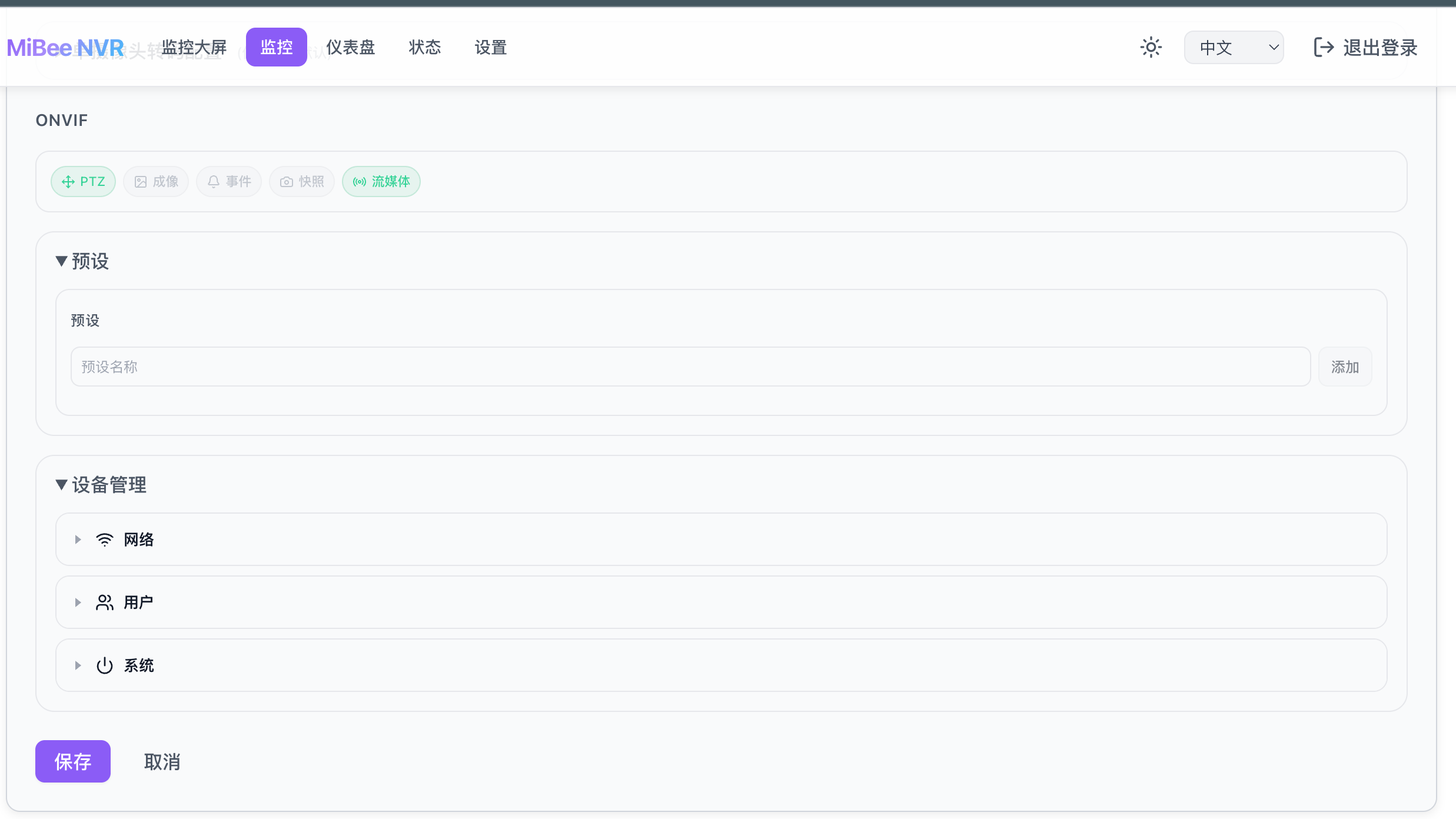
- PTZ Control Joystick + Preset Management — Operate the PTZ directly in LiveView, create and manage presets, one-click home
- Real-time Image Parameter Adjustment — Slider controls for brightness, contrast, saturation, sharpness, changes take effect immediately
- ONVIF Event Stream — Real-time display of camera-reported events (motion detection, alarms, etc.)
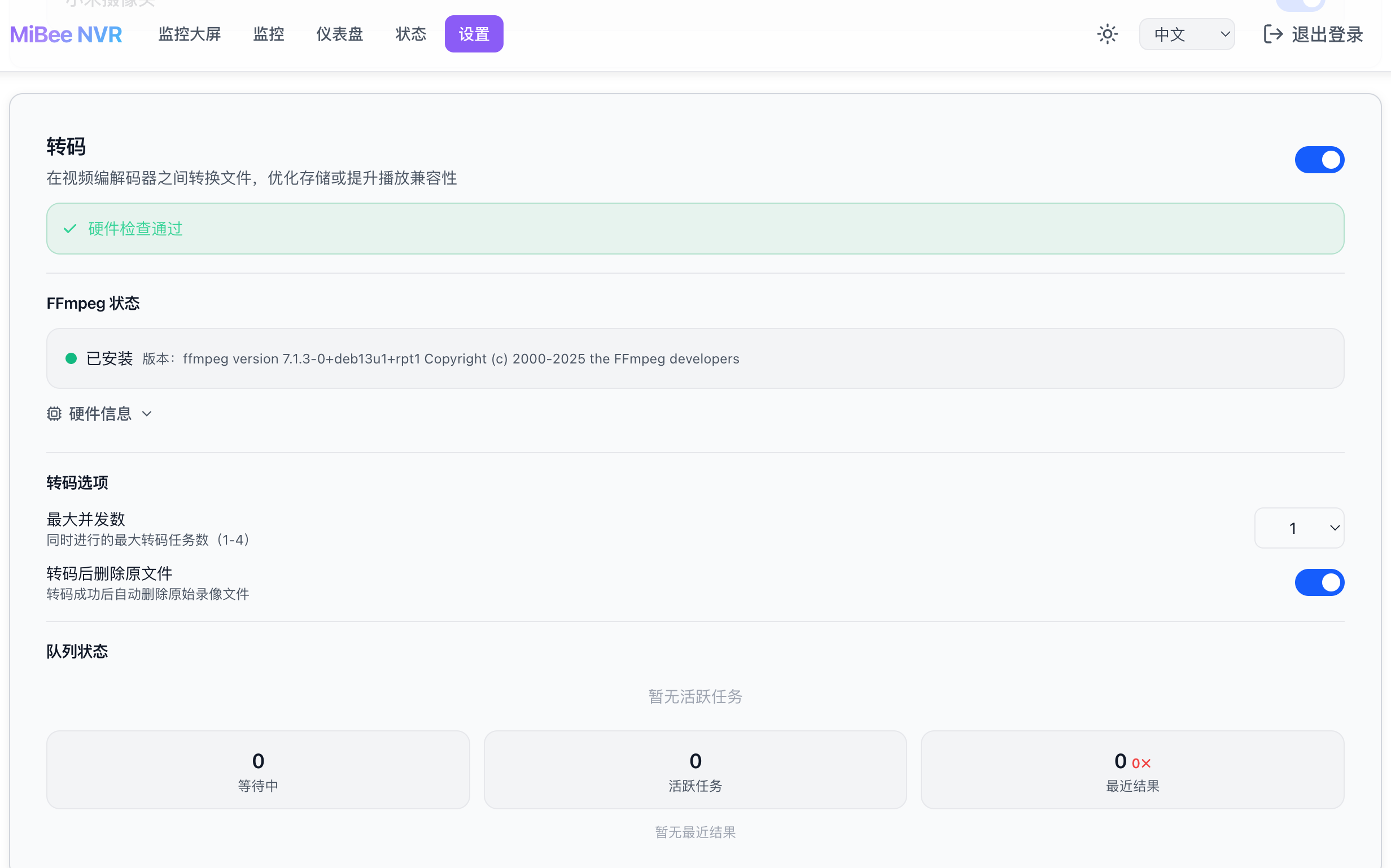
- Transcoding Status Monitoring — New monitoring page showing transcoding task status and performance metrics
Connection Caching
ONVIF’s SOAP requests have significant overhead — each operation requires establishing an HTTP connection, parsing WSDL, and assembling XML. v0.5.0 maintains an ONVIF client connection pool for each camera, avoiding repeated connection setup. For scenarios requiring frequent PTZ or parameter adjustments, response times are noticeably improved.
Why Build rpi-cam
ONVIF protocol development has a very practical problem: you need a working ONVIF server to debug against. Reading protocol docs and packet captures isn’t enough — you need actual interaction with a peer to know if your client implementation is correct.
I had a Raspberry Pi 3B + OV5647 camera lying around, previously running MediaMTX to push RTSP streams. But MediaMTX doesn’t have an ONVIF server mode (GitHub issue #1402), so the NVR couldn’t discover it.
I looked around for existing solutions:
- Python-based — Poor performance, high memory usage
- Incomplete feature set — Only supports Device service, missing Media/PTZ/Imaging
- Requires CGO — Cross-compilation is too painful
And there was a key advantage: MiBeeNvr’s ONVIF client uses the 0x524a/onvif-go library. If the server also uses the same library, client and server would be fully compatible, making debugging especially convenient.
So rpi-cam (also called raspberrypi-camera) was born.
What is rpi-cam
rpi-cam is a lightweight Go-based Raspberry Pi ONVIF camera service, designed specifically for resource-constrained ARM devices. Core features:
- Full ONVIF Profile S — Device/Media/PTZ/Imaging four major services + WS-Discovery
- RTSP Streaming — Uses the same gortsplib library as MediaMTX
- RTMP Push — Supports pushing to cloud services like Alibaba Cloud, Tencent Cloud
- Camera Parameter Control — Real-time adjustment of brightness, contrast, saturation, sharpness
- Digital PTZ — Software cropping for pan, tilt, and zoom
- Zero CGO — Pure Go, cross-compilation without hassle
- 15-25 MB Memory — Memory usage halved compared to MediaMTX
flowchart LR
    subgraph "Raspberry Pi"
        CAM["CSI/USB Camera"]
        RPC["rpi-cam"]
    end

    subgraph "MiBeeNvr"
        ONVIF["ONVIF Client"]
        REC["Recorder"]
    end

    subgraph "Cloud Service"
        CLOUD["RTMP Push"]
    end

    CAM --> RPC
    RPC -->|"ONVIF Profile S"| ONVIF
    RPC -->|"RTSP"| REC
    RPC -->|"RTMP"| CLOUD

    classDef cam fill:#E3F2FD,stroke:#1565C0,color:#1565C0
    classDef app fill:#FFF3E0,stroke:#E65100,color:#BF360C
    classDef ext fill:#E8F5E9,stroke:#2E7D32,color:#1B5E20

    class CAM cam
    class RPC,ONVIF,REC app
    class CLOUD ext
Client + Server Co-development
rpi-cam and MiBeeNvr’s ONVIF implementations both use the same onvif-go library. This means:
- Zero protocol compatibility cost — The client’s SOAP request format and server’s parsing logic are identical
- Bidirectional verification — Problems can be debugged from both client and server sides
- Rapid iteration — Changes to the client can be immediately verified on rpi-cam without waiting for a real camera to respond
In practice, the ONVIF PTZ, Imaging, and Event services were developed simultaneously on both MiBeeNvr (client) and rpi-cam (server) ends. Write the client code for a service, immediately verify it with rpi-cam, and fix issues on the spot. This development efficiency is impossible with real IP cameras — real devices may not support certain operations, and their error messages are often unclear.
Real-world Comparison
On a Raspberry Pi 3B (905MB RAM), here’s the comparison between rpi-cam and MediaMTX:
| Metric | rpi-cam | MediaMTX |
|---|---|---|
| Memory Usage | 15-25 MB | ~45 MB |
| ONVIF Server | ✅ Full Profile S support | ❌ Not supported |
| Camera Parameter Control | ✅ Brightness/contrast etc. | ❌ None |
| RTMP Push | ✅ Built-in | ❌ Requires additional config |
| CGO Dependency | Zero | Yes |
rpi-cam has been running stably on a Raspberry Pi for months without dropping offline. Check out rpi-cam GitHub and the previous introductory article.
Hardware Transcoding System
Another major feature is hardware-accelerated transcoding (H.265 → H.264). Many cameras only output H.265, but browser-side H.265 playback is still challenging. v0.5.0’s transcoding system can automatically detect the input codec and perform hardware-accelerated transcoding when needed:
- Auto-detect — Identify camera codec format, start transcoding on demand
- Hardware acceleration — Leverage device GPU for transcoding, reducing CPU overhead
- Freeze frame prevention — Anti-flicker processing during transcoding for smoother streams
Combined with the new monitoring page, you can view transcoding status and performance metrics in real-time.
Hardware Transcoding Has Hardware Requirements
Transcoding depends on hardware video encoding/decoding capabilities. The current primary device, Raspberry Pi 3B’s VideoCore IV GPU, doesn’t support H.265 hardware decoding. When encountering H.265 cameras, it relies on CPU software decoding, and 905MB RAM + Cortex-A53 @ 1.2GHz is barely adequate.
Next, I’ll be introducing Banana Pi BPI-M5 to improve transcoding and video storage capabilities. The BPI-M5’s Amlogic S905X3 chip has a built-in Mali-G31 MP2 GPU that supports H.265/HEVC 4K@60fps hardware decoding, making it more suitable as an NVR transcoding node.
| Parameter | Raspberry Pi 3B | Banana Pi BPI-M5 |
|---|---|---|
| SoC | Broadcom BCM2837 | Amlogic S905X3 |
| CPU | Cortex-A53 × 4 @ 1.2GHz | Cortex-A55 × 4 @ 1.8GHz |
| GPU | VideoCore IV | Mali-G31 MP2 |
| RAM | 1GB LPDDR2 | 4GB DDR4 |
| H.265 Decode | ❌ Not supported | ✅ 4K@60fps |
| H.264 Decode | ✅ 1080p@30fps | ✅ 1080p@60fps |
| Wired Network | 100Mbps | 1000Mbps |
| USB | 2.0 × 4 | 3.0 × 4 |
| Storage | microSD | eMMC + microSD |
The BPI-M5 comprehensively outperforms the Raspberry Pi 3B in CPU performance, memory, H.265 hardware decode, gigabit Ethernet, and USB 3.0. In an NVR scenario, gigabit Ethernet means more concurrent cameras without congestion, 4GB RAM can cache more live streams, and H.265 hardware decode eliminates transcoding as a bottleneck. Subsequent transcoding improvements will be developed on the BPI-M5.
Recorder Reconnection Optimization
v0.5.0 restructured the recorder’s reconnection strategy. Previously using exponential backoff, fixed-interval retries proved more controllable in practice. The new tiered backoff strategy:
| |
Each tier has random jitter to prevent multiple cameras from reconnecting simultaneously after a simultaneous disconnection, which could cause a thundering herd problem. RTSP connection timeout is also configurable, allowing adjustment based on network conditions.
Bug Fixes
v0.5.0 fixed several stability-impacting issues:
- CS2 buffer overflow — Drops oldest frames instead of triggering full P2P reconnection, significantly improving Xiaomi camera stability
- Docker first-start crash — autoInitConfig calls ApplyDefaults(), HLS fields correctly populated before validation
- Health alert false positives — Fixed thresholds, added debounce, support per-camera overrides
- UI auth redirect loop — Fixed hash sync issue causing navigation infinite loop
- ONVIF ContinuousMove — Provides default timeout
- ONVIF PTZ presets — Added missing HTTP endpoints
Community Feedback Resolved
v0.4.x and v0.5.0 received substantial community feedback. Here are the resolved issues from GitHub Issues:
Docker Deployment Issues
#6 Database open failed — Docker first-start db open: unable to open database file (14). Root cause: DB initialization executed before the storage manager created the directory. Fixed by adding os.MkdirAll to ensure the directory exists.
#8 Greenlink NAS permission error — Docker deployment on Greenlink NAS had permission mismatches. Solution: set Docker user:0:0, file manager sets data directory permissions to regular user.
#13 Docker first-start missing configuration — Auto-generated config on Docker first-start didn’t populate HLS defaults correctly, causing hls.segment_count must be between 3 and 10, got 0 error. v0.5.0’s autoInitConfig calls ApplyDefaults() to ensure HLS fields are populated before validation.
Xiaomi Camera Connection Stability
#10 / #11 Xiaomi camera frequent disconnections — Cameras cycling between “recording” and “reconnecting” states, logs showing cs2: pop buffer is full and cs2: EOF.
v0.5.0 applies a three-layer fix:
- Buffer overflow no longer triggers reconnection — When full, drops oldest frames and pushes new ones instead of triggering a full P2P reconnection. For video streams, dropping a frame is far cheaper than rebuilding the entire session.
- Reconnection strategy changed to tiered backoff — First 5 times: 1s, 5-9 times: 5s, 10-19 times: 10s, 20+: 60s, reset counter on successful connection.
- CS2 connection stall fix — Fixed connection stalling after ~20 minutes, eliminated data race in UDP writes.
#5 Camera unavailable after container restart — Some cameras use the TUTK protocol (not CS2), and the code still requested TUTK parameters from the Xiaomi cloud, causing misleading errors. TUTK has been removed from cloud requests; cameras that only support TUTK will show a clear prompt when added.
Device Compatibility
#9 Xiaomi Smart Outdoor Camera 4 Pro 3-lens Zoom — This model uses the TUTK transport protocol (not CS2), which requires a commercial license and is currently out of support scope. If the camera supports RTSP, RTSP-based integration is recommended.
If you’ve encountered similar issues, try upgrading to the latest version first. If the problem persists, feel free to submit a report to GitHub Issues with logs included, and I’ll follow up.
About ONVIF Compatibility
Although the ONVIF protocol claims to be a standard, implementations vary significantly between manufacturers. rpi-cam, as a development and debugging tool, ensures MiBeeNvr’s own ONVIF implementation is correct, but when connecting to real commercial IP cameras, various edge cases may still arise.
Full ONVIF compatibility still needs time to validate. It has currently been tested primarily with rpi-cam (our custom server) and a small number of real cameras, with limited brand and model coverage. If you encounter issues when using MiBeeNvr with ONVIF cameras — such as device discovery failure, PTZ control unresponsiveness, or parameter adjustment failures — please submit a report to GitHub Issues, including the camera model and a description of the behavior, and I’ll investigate.
Upgrade
| |
Configuration is backward compatible — just replace the binary.