eBPF Series: DeepFlow Extended Protocol Parsing Practice (MongoDB Protocol & Kafka Protocol)
- Overview:
- How to Analyze a Protocol (MongoDB)
- Extending Protocol Parsing in
DeepFlow Agent - Extending DeepFlow Protocol Collection Using
WasmPlugins - Conclusion
- Appendix
Overview
MongoDB is widely used today, but lacks effective observability capabilities.
DeepFlow is an excellent solution for observability, but it lacks support for the MongoDB protocol.
This article extends DeepFlow with MongoDB protocol parsing, enhancing observability in the MongoDB ecosystem. It briefly describes the process from protocol document analysis to implementing code parsing within DeepFlow.
How to Analyze a Protocol (MongoDB)
Protocol Document Analysis Approach
First, find the protocol parsing documentation from the official website. In the protocol document mongodb-wire-protocol#standard-message-header, we can see the MongoDB protocol header struct description as follows:
| |
The above struct can be visualized in the following diagram:

Note: The protocol document
mongodb-wire-protocolstates that the MongoDB protocol uses little-endian byte order.Byte Ordering All integers in the MongoDB wire protocol use little-endian byte order: that is, least-significant
Now let’s look at actual packet capture data to see what the raw data looks like:
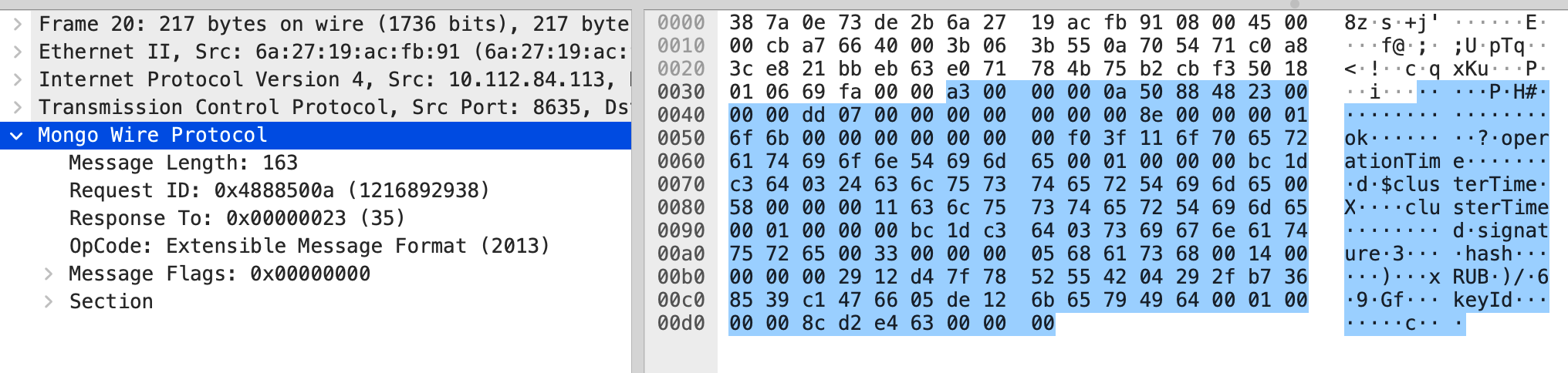
| |
The packet capture data above can be broken down as follows:
- Field
messageLengthisa3 00 00 00: message length isa3- Field
requestIDis0a 50 88 48: request ID is4888500a- Field
responseTois23 00 00 00: response to ID23- Field
opCodeisdd 07 00 00: command number is7dd, decimal2013, corresponding toOP_MSGin the protocol document.
MongoDB Protocol OpCode Reference Table
| OpCode Name | OpCode | Description | Notes |
|---|---|---|---|
| OP_COMPRESSED | 2012 | Use compression | |
| OP_MSG | 2013 | Send a message using the standard format. Used for both client requests and database replies. | |
| OP_REPLY | 1 | Specify response to client request via responseTo. | Deprecated in MongoDB 5.0. Removed in MongoDB 5.1. |
| OP_UPDATE | 2001 | Update document | Deprecated in MongoDB 5.0. Removed in MongoDB 5.1. |
| OP_INSERT | 2002 | Insert document | Deprecated in MongoDB 5.0. Removed in MongoDB 5.1. |
| RESERVED | 2003 | Skip | |
| OP_QUERY | 2004 | Query document | Deprecated in MongoDB 5.0. Removed in MongoDB 5.1. |
| OP_GET_MORE | 2005 | Skip | Deprecated in MongoDB 5.0. Removed in MongoDB 5.1. |
| OP_DELETE | 2006 | Delete document | Deprecated in MongoDB 5.0. Removed in MongoDB 5.1. |
| OP_KILL_CURSORS | 2007 | Skip | Deprecated in MongoDB 5.0. Removed in MongoDB 5.1. |
Analyzing the Most Common OpCode OP_MSG
From the protocol document mongodb-wire-protocol#op_msg, check the OP_MSG struct:
| |
The decoding content to focus on for
OP_MSGis inSections. We only need to handlekindvalues of0and1:
- 0: Use
BSONdecoding directly afterwards;- 1: Offset by
int32andc_stringbytes first, then useBSONto decode the remaining content.

Let’s look at the raw data from an actual packet capture. As shown below, the MongoDB protocol’s OP_MSG content starts from the 16th byte (counting from 0, consistent throughout this document).
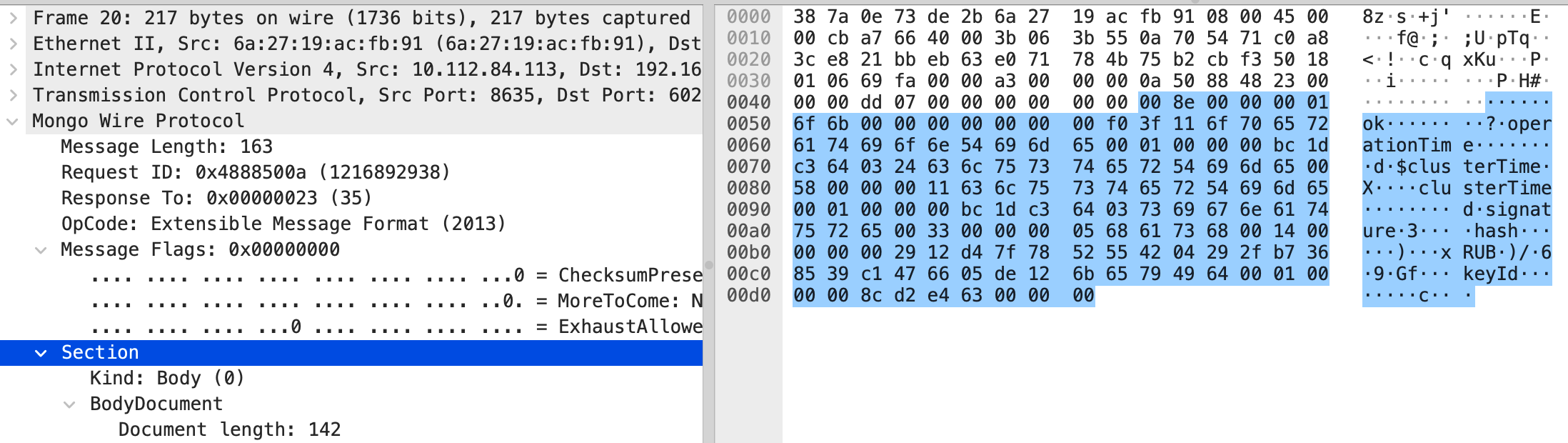
| |
No need to worry about the
flagBitsfield. Skip 4 bytes and check thekindtype from the 4th byte. This determines whether the following data isBSONstructure data.
At this point, we’ve basically understood the MongoDB protocol’s data structure and decoding approach. Now let’s try implementing the decoding in DeepFlow Agent.
Extending Protocol Parsing in DeepFlow Agent
DeepFlow Agent Development Document Overview
Prerequisite: Native development for
DeepFlow Agentrequires basicRustlanguage skills. First, refer to the official documentationHOW_TO_SUPPORT_YOUR_PROTOCOL_ENto understand a few key points.
L7Protocol— used to identify protocol constants Source location:deepflow/agent/crates/public/src/l7_protocol.rsL7ProtocolParser— mainly used for protocol identification and parsing intoL7ProtocolInfo(basic structure info for L7 protocols) Source location:deepflow/agent/src/common/l7_protocol_log.rsL7ProtocolInfo— parsed byL7ProtocolParserand used for subsequent session aggregation Source location:deepflow/agent/src/common/l7_protocol_info.rsL7ProtocolInfoInterface— all L7 protocol structuresL7ProtocolInfoneed to implement this interface to handle feature logic Source location:deepflow/agent/src/common/l7_protocol_info.rsL7ProtocolSendLog— unified structure for sending todeepflow-serverSource location:deepflow/agent/src/flow_generator/protocol_logs/pb_adapter.rs
General steps for development in
deepflow-agent:
- Add the corresponding protocol name and number in
deepflow/agent/crates/public/src/l7_protocol.rs.L7ProtocolParser::parse_payload()needs to returnL7ProtocolInfo, so first define a struct, implement theL7ProtocolInfoInterfacetrait, and add it to theL7ProtocolInfoenum.- Implement the
L7ProtocolParserInterfacetrait and add it to theimpl_protocol_parser!macro indeepflow/agent/src/common/l7_protocol_log.rs.- On the
deepflow-serverside, just add a constant for search hints.
Code Guide
Define a Protocol with a Constant Identifier
Source location:
deepflow/agent/crates/public/src/l7_protocol.rs. TheAgentdetermines the application layer protocol of a flow by iterating through all supported protocols. Note: Since there’s no constraint field in industry-standard application protocols to define the application protocol type, in large-scale network packet processing, the application layer protocol is determined by iterating through known protocol decoding logic.
| |
| |
Prepare Parsing Logic for the New Protocol
Define the Struct
Create the protocol parsing logic code file in a directory under deepflow/agent/src/flow_generator/protocol_logs/. In this case, the code file is placed at sql/mongo.rs under the above directory.
| |
Implement L7ProtocolParserInterface
- First look at the source struct logic (only the functions that need to be processed are shown below; for those not needing processing, keep the default logic):
| |
The first step in decoding a protocol is how to identify it. The code needs to handle
L7ProtocolParserInterface::check_payload()logic.- Define the
MongoDBprotocol header and decode it
1 2 3 4 5 6 7 8 9 10 11 12 13 14 15 16 17 18 19 20 21 22// Define the MongoDB protocol header struct, and decode the necessary fields #[derive(Clone, Debug, Default, Serialize)] pub struct MongoDBHeader { length: u32, request_id: u32, response_to: u32, op_code: u32, op_code_name: String, } impl MongoDBHeader { fn decode(&mut self, payload: &[u8]) -> isize { // Decode the first 16 bytes of payload according to MongoDBHeader struct, // and determine if it matches the MongoDB protocol. } fn is_request(&self) -> bool { // Decode op_code to determine if it's a request } pub fn get_op_str(&self) -> &'static str { // Decode op_code to the corresponding text description } }- Call the
MongoDBprotocol header decoding logic inL7ProtocolParserInterface::check_payload()In this process, also handleprotocol(&self)andparsable_on_udp(&self).
1 2 3 4 5 6 7 8 9 10 11 12impl L7ProtocolParserInterface for MongoDBLog { fn check_payload(&mut self, payload: &[u8], param: &ParseParam) -> bool { let mut header = MongoDBHeader::default(); header.decode(payload); return header.is_request(); } fn protocol(&self) -> L7Protocol { L7Protocol::MongoDB } // Skip decoding for udp protocols fn parsable_on_udp(&self) -> bool { false } }- Result display of the first step
At this step, the decoding will produce the following display. The next step is to further decode the specific protocol opcodes.
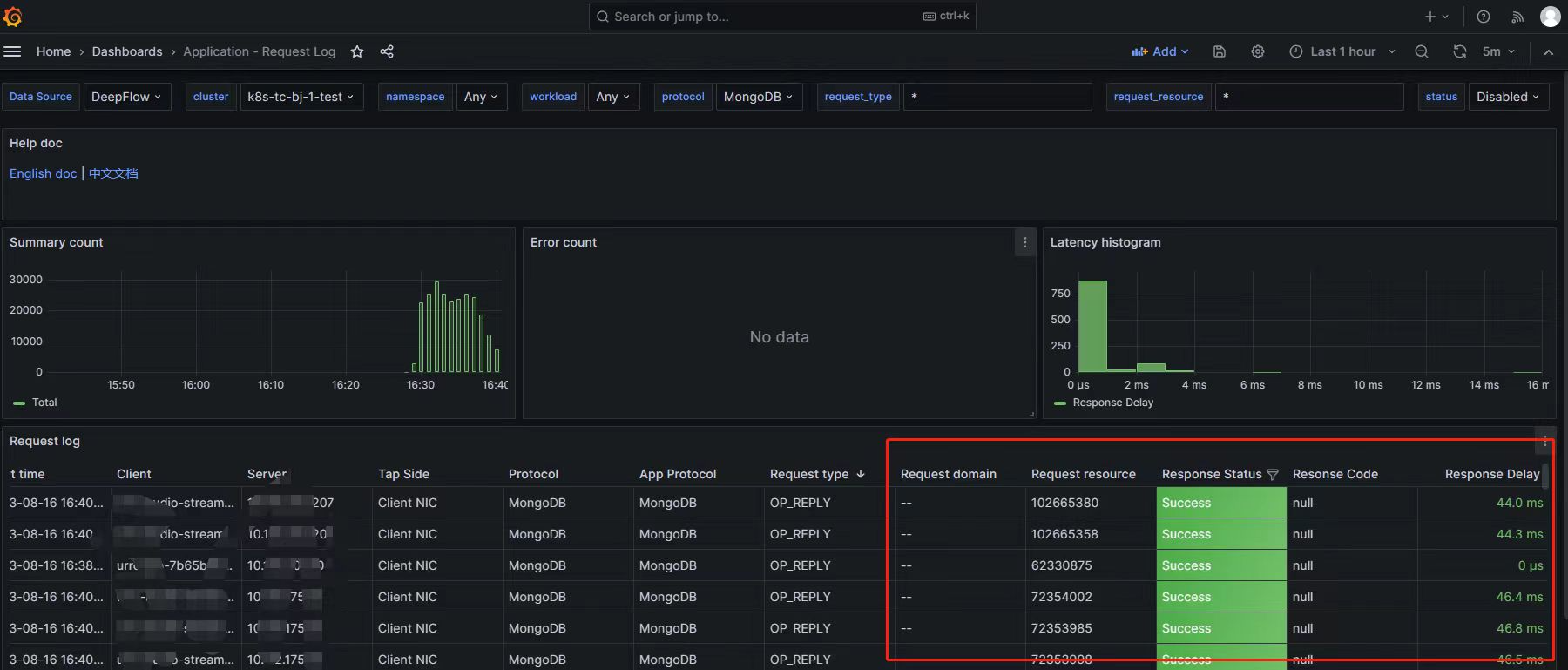
- Define the
The second step in decoding the protocol is to define structs and decoding interface logic for key commands, corresponding to the
L7ProtocolParserInterface::parse_payload()code implementation. Let’s useOP_MSGas an example.- Define the
OP_MSGopcode struct and decode it
1 2 3 4 5 6 7 8 9 10 11 12 13 14 15#[derive(Clone, Debug, Default, Serialize)] pub struct MongoOpMsg { flag: u32, sections: Sections, checksum: Option<u32>, } impl MongoOpMsg { fn decode(&mut self, payload: &[u8]) -> Result<bool> { // Skip offset logic let _ = sections.decode(&payload); self.sections = sections; Ok(true) } }- Further decode the
Sectionsfield that needs attention in theOP_MSGopcode
1 2 3 4 5 6 7 8 9 10 11 12 13 14 15 16 17 18 19 20 21 22#[derive(Clone, Debug, Default, Serialize)] struct Sections { kind: u8, kind_name: String, // kind: 0 means doc doc: Document, // kind: 1 means body size: Option<i32>, c_string: Option<String>, } impl Sections { pub fn decode(&mut self, payload: &[u8]) -> Result<bool> { match self.kind { 0 => { // Body } 1 => { // Doc } 2 => { // Internal } _ => { // Unknown } } Ok(true) } }- Handle
L7ProtocolParserInterface::parse_payload, returnL7ProtocolInfo
1 2 3 4 5 6 7 8 9 10 11 12 13 14 15 16 17 18 19 20 21 22 23 24 25#[derive(Clone, Debug, Default, Serialize)] pub struct MongoDBLog { info: MongoDBInfo, #[serde(skip)] perf_stats: Option<L7PerfStats>, } impl L7ProtocolParserInterface for MongoDBLog { fn parse_payload(&mut self, payload: &[u8], param: &ParseParam) -> Result<L7ParseResult> { let mut info = MongoDBInfo::default(); self.parse(payload, param.l4_protocol, param.direction, &mut info)?; // Decode to get L7ProtocolInfo } } impl MongoDBLog { fn parse(&mut self, payload:&[u8], proto:IpProtocol, dir:PacketDirection, info:&mut MongoDBInfo) -> Result<bool> { // Decode command to get request and response info match info.op_code { _OP_MSG if payload.len() > _MSG_DOC_SECTION_OFFSET => { // OP_MSG let mut msg_body = MongoOpMsg::default(); // TODO: Message Flags msg_body.decode(&payload[_MSG_DOC_SECTION_OFFSET..])?; } } } }- Implement
L7ProtocolInfoInterfaceforMongoDBInfo
1 2 3 4 5 6 7 8 9 10 11 12 13 14 15 16 17 18 19 20 21impl L7ProtocolInfoInterface for MongoDBInfo { fn session_id(&self) -> Option<u32> { // Return stream identifier id, e.g., http2 returns streamid, dns returns transaction id, return None if not applicable } fn merge_log(&mut self, other: L7ProtocolInfo) -> Result<()> { // Here self is definitely the request, other is definitely the response if let L7ProtocolInfo::MongoDBInfo(other) = other { self.merge(other); } Ok(()) } fn app_proto_head(&self) -> Option<AppProtoHead> { // Return an AppProtoHead struct, return None to directly discard this data Some(AppProtoHead { proto: L7Protocol::MongoDB, }) } fn is_tls(&self) -> bool { self.is_tls } }- Implement
L7ProtocolSendLogforMongoDBInfo
1 2 3 4 5 6 7 8 9 10 11 12 13 14 15 16 17 18 19 20impl From<MongoDBInfo> for L7ProtocolSendLog { fn from(f: MongoDBInfo) -> Self { let log = L7ProtocolSendLog { // Convert info to the unified send structure L7ProtocolSendLog }; return log; } } // Reference source: deepflow/agent/src/flow_generator/protocol_logs/pb_adapter.rs pub struct L7ProtocolSendLog { pub req_len: Option<u32>, pub resp_len: Option<u32>, pub row_effect: u32, pub req: L7Request, pub resp: L7Response, pub version: Option<String>, pub trace_info: Option<TraceInfo>, pub ext_info: Option<ExtendedInfo>, }- Add the interface implementing
L7ProtocolParserInterfaceto theimpl_protocol_parser!macro indeepflow/agent/src/common/l7_protocol_log.rs.
1 2 3 4 5 6 7 8 9 10 11 12 13 14 15 16 17impl_protocol_parser! { pub enum L7ProtocolParser { // http have two version but one parser, can not place in macro param. // custom must in first so can not place in macro DNS(DnsLog), SofaRPC(SofaRpcLog), MySQL(MysqlLog), Kafka(KafkaLog), Redis(RedisLog), + MongoDB(MongoDBLog), PostgreSQL(PostgresqlLog), Dubbo(DubboLog), FastCGI(FastCGILog), MQTT(MqttLog), // add protocol below } }- Result of the second step
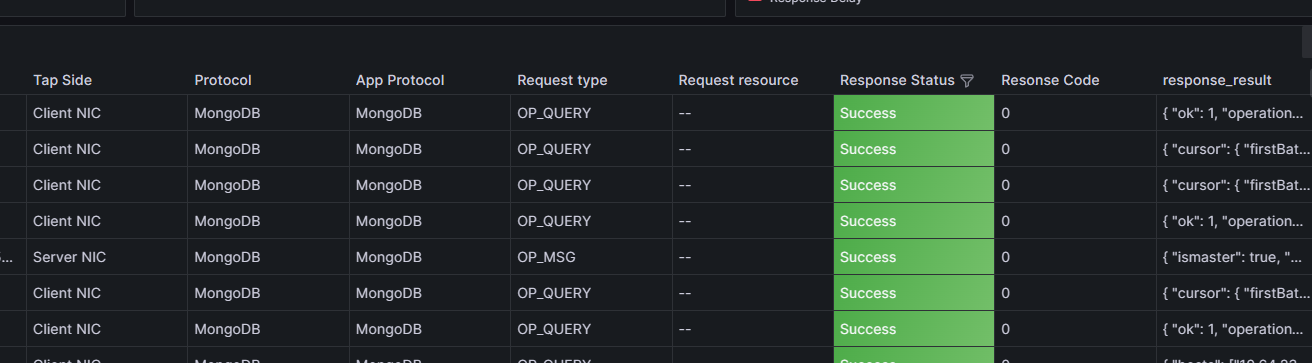
- Define the
Record
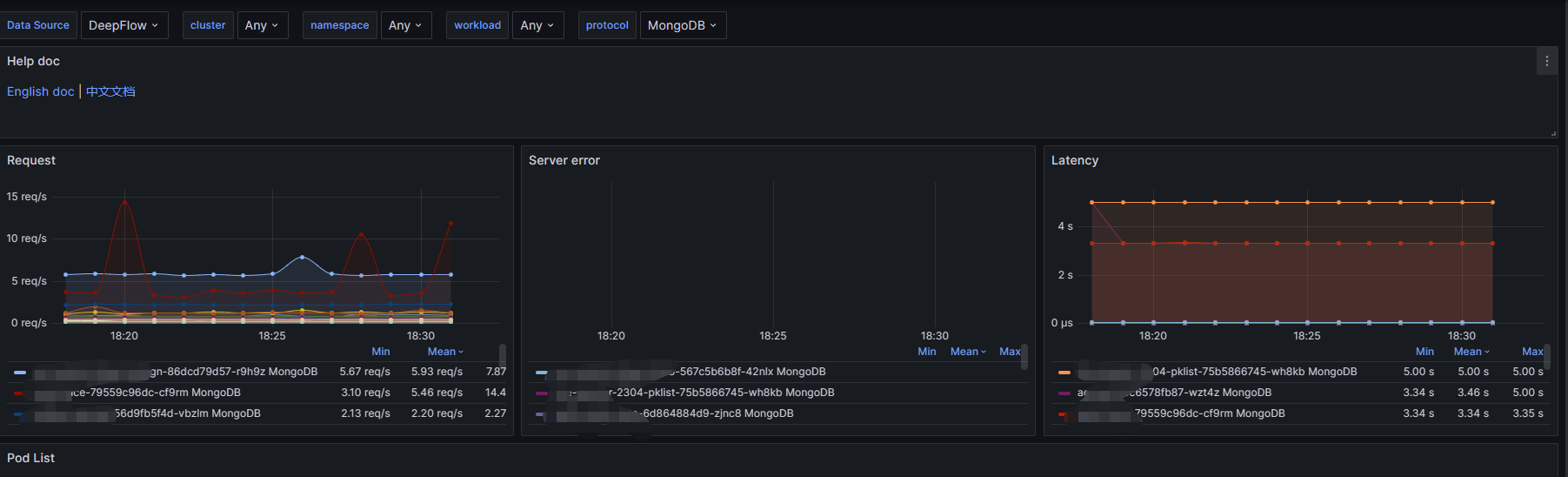
QPS,Latency, andErrorsthroughperf_stats:
| |
Result:
- Finally, supplement the server-side protocol identification in
serverThe following two parts are in the code fileserver/libs/datatype/flow.go
| |
| |
server/querier/db_descriptions/clickhouse/tag/enum/l7_protocol
| |
At this point, the native protocol extension of DeepFlow Agent is complete. Refer to the Complete Guide: How to Compile, Package and Deploy Custom DeepFlow to compile and publish.
If you want to quickly implement a protocol collection parser, or if you’re not familiar with Rust, there’s another option: use Wasm plugins to quickly extend protocol decoding.
Extending DeepFlow Protocol Collection Using Wasm Plugins
This case study uses
Wasmto extend theKafkaprotocol withTopicsupport. First, let’s reference the official Kafka documentation to do a simple analysis of the Kafka protocol.
Kafka Protocol Analysis
Kafka Header and Data Overview

Kafka Fetch API

Kafka Produce API

Kafka Protocol DeepFlow Agent Native Decoding
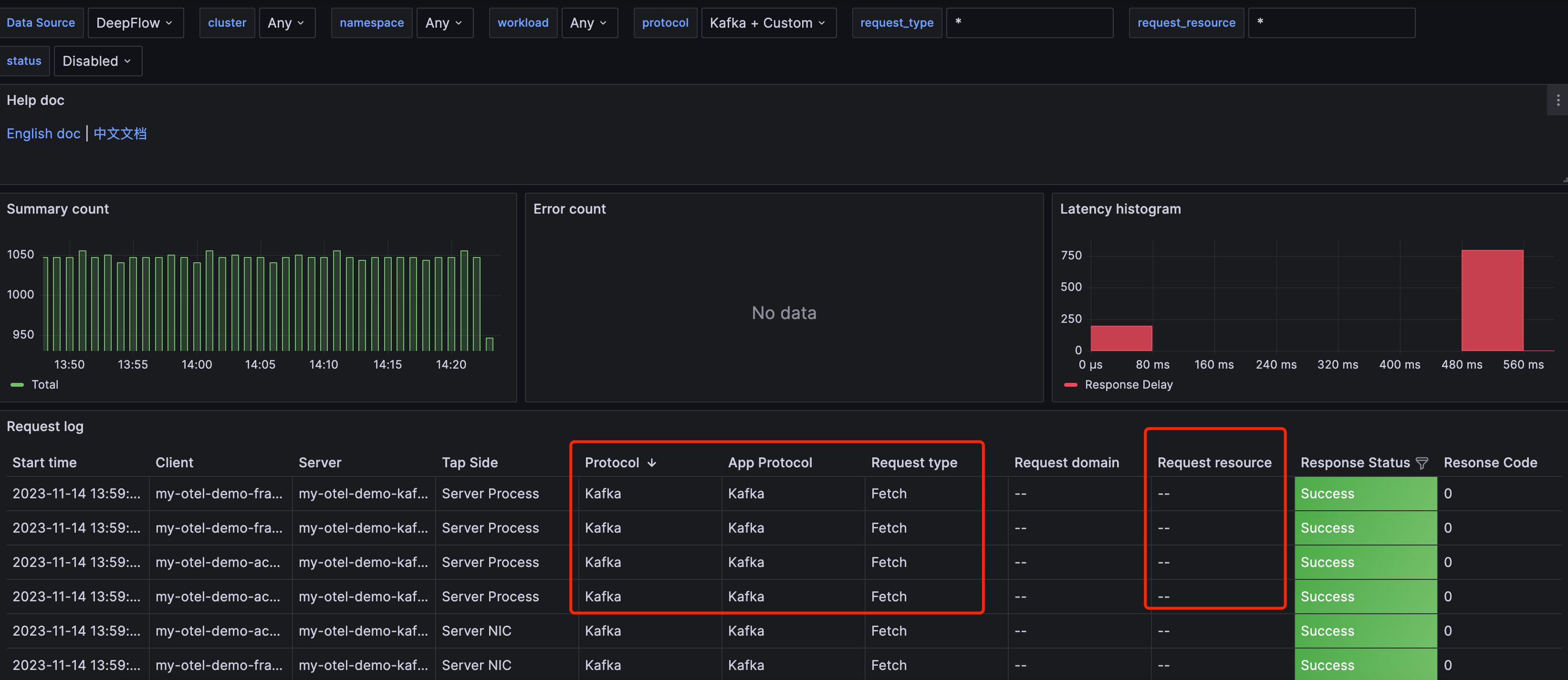
As of v6.3.x, the native decoding of Kafka by DeepFlow Agent is as shown below. It doesn’t yet support decoding the Topic field, and API decoding doesn’t have version numbers yet. The main goal of the plugin development that follows is to decode the Topic field and display it in the resource, while also parsing the API version numbers.
DeepFlow Agent Wasm Plugin
Refer to the official plugin documentation wasm-plugin. Two things to note:
- The
Agentdetermines the application layer protocol of a flow by iterating through all supported protocols, in the order:HTTP->Wasm Hook->DNS-> … - Requires
Goversion no lower than1.21andtinygoversion no lower than0.29
Wasm Go SDK Framework
- First, get a general understanding of the framework. As shown in the code below, the entire framework logic is in the following five interface functions.
| |
- The Agent iterates through all plugins calling the corresponding Export functions, but the iteration behavior can be controlled by the return value.
| Return Value | Description |
|---|---|
| sdk.ActionNext() | Stop current plugin, execute the next plugin directly |
| sdk.ActionAbort() | Stop current plugin and stop traversal |
| sdk.ActionAbortWithErr(err) | Stop current plugin, print error log and stop traversal |
| sdk.HttpActionAbortWithResult() | Agent stops traversal and extracts the corresponding result |
| sdk.ParseActionAbortWithL7Info() | Agent stops traversal and extracts the corresponding result |
⚠️Note: Since this case doesn’t involve
HTTPprotocol processing,OnHttpReq()andOnHttpResp()can directly usesdk.ActionNext()to skip. This case also won’t usesdk.HttpActionAbortWithResult().
- The three
hookpoints ofHookBitmap
| Hook Point | Description |
|---|---|
| HOOK_POINT_HTTP_REQ | Called before http request parsing completes and returns |
| HOOK_POINT_HTTP_RESP | Called before http response parsing completes and returns |
| HOOK_POINT_PAYLOAD_PARSE | For protocol identification and parsing |
⚠️Note: Since this case doesn’t involve
HTTPprotocol processing,HOOK_POINT_HTTP_REQandHOOK_POINT_HTTP_RESPare not used.
Plugin Code Guide
- The structured
KafkaprotocolWasmplugin code framework
| |
- Protocol identification
⚠️Note: Code comments below
| |
Protocol API decoding
- The official code framework’s
OnParsePayload()logic is as follows:
1 2 3 4 5 6 7 8 9 10 11 12 13 14 15 16 17 18 19 20 21 22 23 24 25 26 27 28 29 30 31func (p plugin) OnParsePayload(baseCtx *sdk.ParseCtx) sdk.ParseAction { // ctx.L7 is the protocol number returned by OnCheckPayload, can filter by L4 protocol or protocol number first. if ctx.L4 != sdk.TCP {return sdk.ActionNext()} payload, err := ctx.GetPayload() if err != nil {return sdk.ActionAbortWithErr(err)} // the parse logic here // ... /* About the L7ProtocolInfo struct: type L7ProtocolInfo struct { ReqLen *int // Request length, e.g., http content-length RespLen *int // Response length, e.g., http content-length RequestID *uint32 // Sub-stream identifier id, e.g., http2 stream id, dns transaction id Req *Request Resp *Response Trace *Trace // Trace info Kv []KeyVal // Corresponds to attribute } type Request struct { ReqType string // Corresponds to request type Domain string // Corresponds to request domain Resource string // Corresponds to request resource Endpoint string // Corresponds to endpoint } type Response struct { Status RespStatus // Corresponds to response status Code *int32 // Corresponds to response code Result string // Corresponds to response result Exception string // Corresponds to response exception }*/ return sdk.ParseActionAbortWithL7Info([]*sdk.L7ProtocolInfo{}) }- Topic field decoding logic
1 2 3 4 5 6 7 8 9 10 11 12 13 14 15 16 17 18 19 20 21 22 23 24 25 26 27 28 29 30 31func (p kafkaParser) OnParsePayload(ctx *sdk.ParseCtx) sdk.Action { // the parse logic here // ... // Decode header base size: // req_len(int32) + api_key(int16) + api_ver(int16) + c_id(int32) + client_len(int16) // = 14 var header_offset = 14 + header.clientLen var topic_size int16 = 0 var topic_name = "" switch protocol.ApiKey(header.apikey) { case protocol.Produce: topic_size, topic_name = decodeProduce(header.apiversion, payload[header_offset:]) case protocol.Fetch: topic_size, topic_name = decodeFetch(header.apiversion, payload[header_offset:]) } if topic_size == 0 { return sdk.ActionNext() } req = &sdk.Request{ ReqType: protocol.ApiKey(header.apikey).String() + "_v" + strconv.Itoa(int(header.apiversion)), Resource: topic_name, } return sdk.ParseActionAbortWithL7Info([]*sdk.L7ProtocolInfo{ { RequestID: &id, ReqLen: &length, Req: req, }, }) }- The official code framework’s
Loading the Plugin and Result Display
Compile the plugin with the following command and load it via CTL:
| |
Prepare the Agent configuration file with the following additions. Note that the Agent can load multiple Wasm plugins.
| |
Run the command to update the configuration:
| |
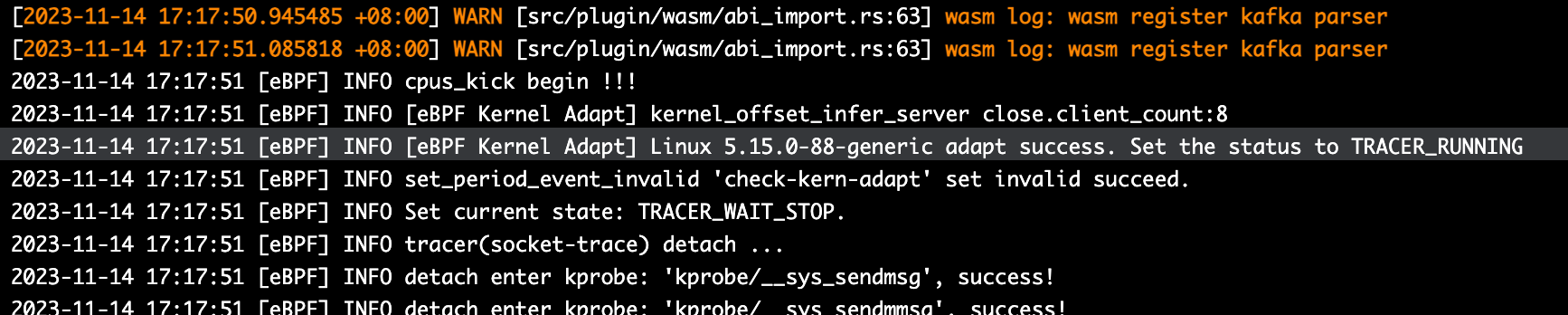
When the Agent log shows the yellow content as shown in the image below, it means the loading was successful.
In Grafana, you can see that the native Kafka protocol has been overridden, with several changes:
- The
Protocolfield changed fromKafkatoCustom - The
Request typefield now includes API version numbers - The
Request resourcefield now showsTopicinformation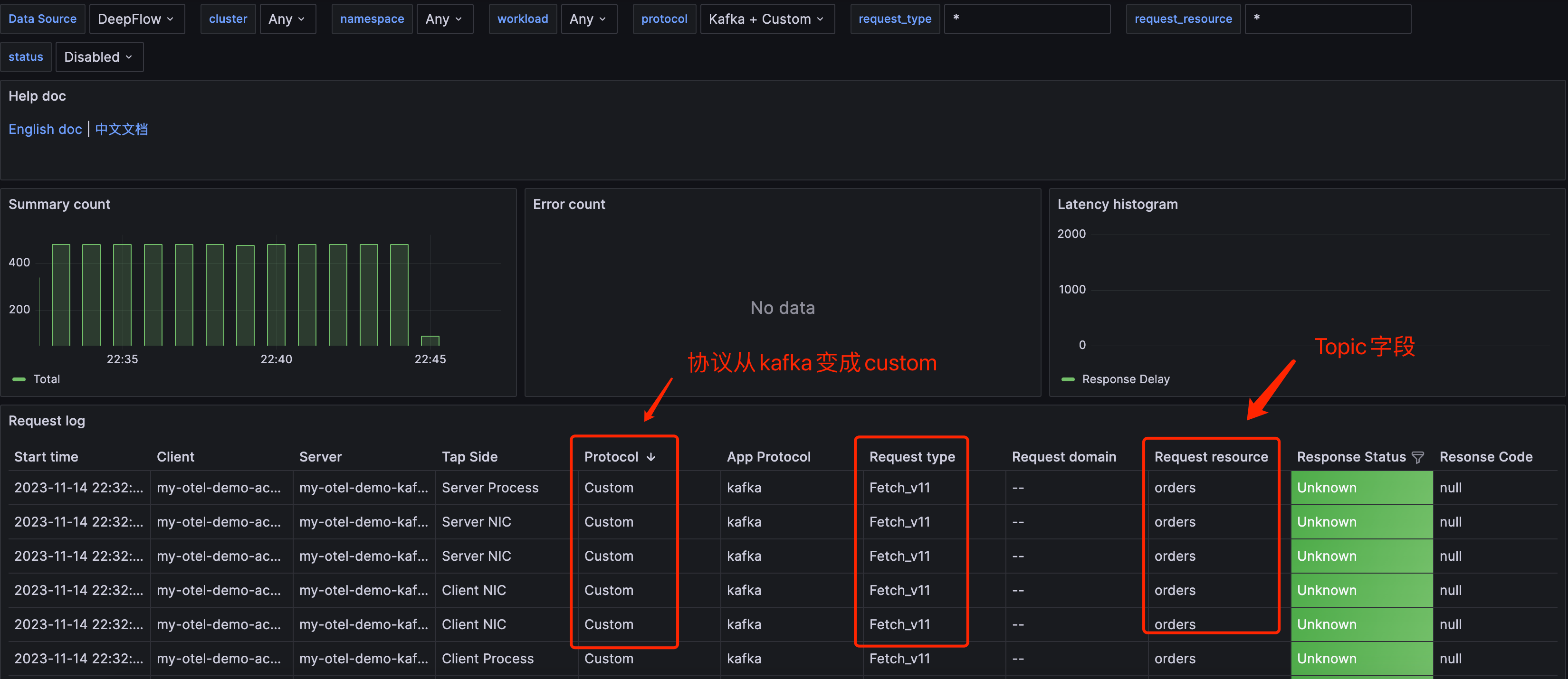
Conclusion
Finally, let’s compare the two protocol extension approaches. Note ⚠️: Both approaches share a common issue: each added protocol reduces the efficiency of protocol identification and decoding. The number of protocols to decode can be reduced through configuration.
Native Rust Extension
- Advantages:
- Lower runtime resource usage compared to plugins
- Supports richer functionality than plugins, with more flexible customization
- Disadvantages:
- Higher development difficulty in terms of language compared to plugins
- Adding a new protocol requires changes in more locations, including a small portion of Server code
Wasm Plugin Extension
- Advantages:
- Lower development difficulty with Golang compared to Rust
- Can be loaded at runtime via CLI
- Strong extensibility
- Disadvantages:
- Go’s standard library and third-party libraries have certain limitations, and debugging is difficult, making plugin anomalies hard to troubleshoot
- Due to Wasm’s inherent limitations, functionality is weaker compared to native Rust development
- Increased resource consumption, especially in terms of memory