Monitoring Collection Notes
MySQL Monitoring
MySQL Privilege Best Practices
Privilege control is primarily for security reasons, so follow these best practices:
- Grant only the minimum privileges needed to prevent users from doing harm. For example, if a user only needs to query, just grant SELECT privileges, not UPDATE, INSERT, or DELETE.
- Restrict the login host when creating users, typically to a specific IP or internal network IP range.
- Delete users without passwords after initializing the database. The installation automatically creates some users with no passwords by default.
- Set passwords that meet complexity requirements for each user.
- Periodically clean up unnecessary users. Revoke privileges or delete users.
Example:
For MySQL monitoring, create a monitoring account with separate grants for local and remote monitoring:
| |
Monitoring Methods
show global status; View global status show global variables; View global variable settings mysqladmin MySQL management tool show master status; View Master status show slave status; View Slave status show binary logs; View binary log files show engine innodb status\G View InnoDB storage engine status show engine myisam status\G View MyISAM storage engine status
You can also query the information_schema database to get InnoDB storage engine related information.
Privilege Table
| Privilege | Privilege Level | Description |
|---|---|---|
| CREATE | Database, table, or index | Create database, table, or index |
| DROP | Database or table | Drop database or table |
| GRANT OPTION | Database, table, or stored program | Grant privilege option |
| REFERENCES | Database or table | |
| ALTER | Table | Alter table, such as adding fields, indexes |
| DELETE | Table | Delete data |
| INDEX | Table | Index privilege |
| INSERT | Table | Insert privilege |
| SELECT | Table | Query privilege |
| UPDATE | Table | Update privilege |
| CREATE VIEW | View | Create view |
| SHOW VIEW | View | View view |
| ALTER ROUTINE | Stored procedure | Alter stored procedure |
| CREATE ROUTINE | Stored procedure | Create stored procedure |
| EXECUTE | Stored procedure | Execute stored procedure |
| FILE | File access on server host | File access privilege |
| CREATE TEMPORARY TABLES | Server management | Create temporary table |
| LOCK TABLES | Server management | Lock table |
| CREATE USER | Server management | Create user |
| PROCESS | Server management | View process |
| RELOAD | Server management | Execute flush-hosts, flush-logs, flush-privileges, flush-status, flush-tables, flush-threads, refresh, reload commands |
| REPLICATION CLIENT | Server management | Replication privilege |
| REPLICATION SLAVE | Server management | Replication privilege |
| SHOW DATABASES | Server management | View databases |
| SHUTDOWN | Server management | Shutdown database |
| SUPER | Server management | Execute kill thread privilege |
TCP
Figure: 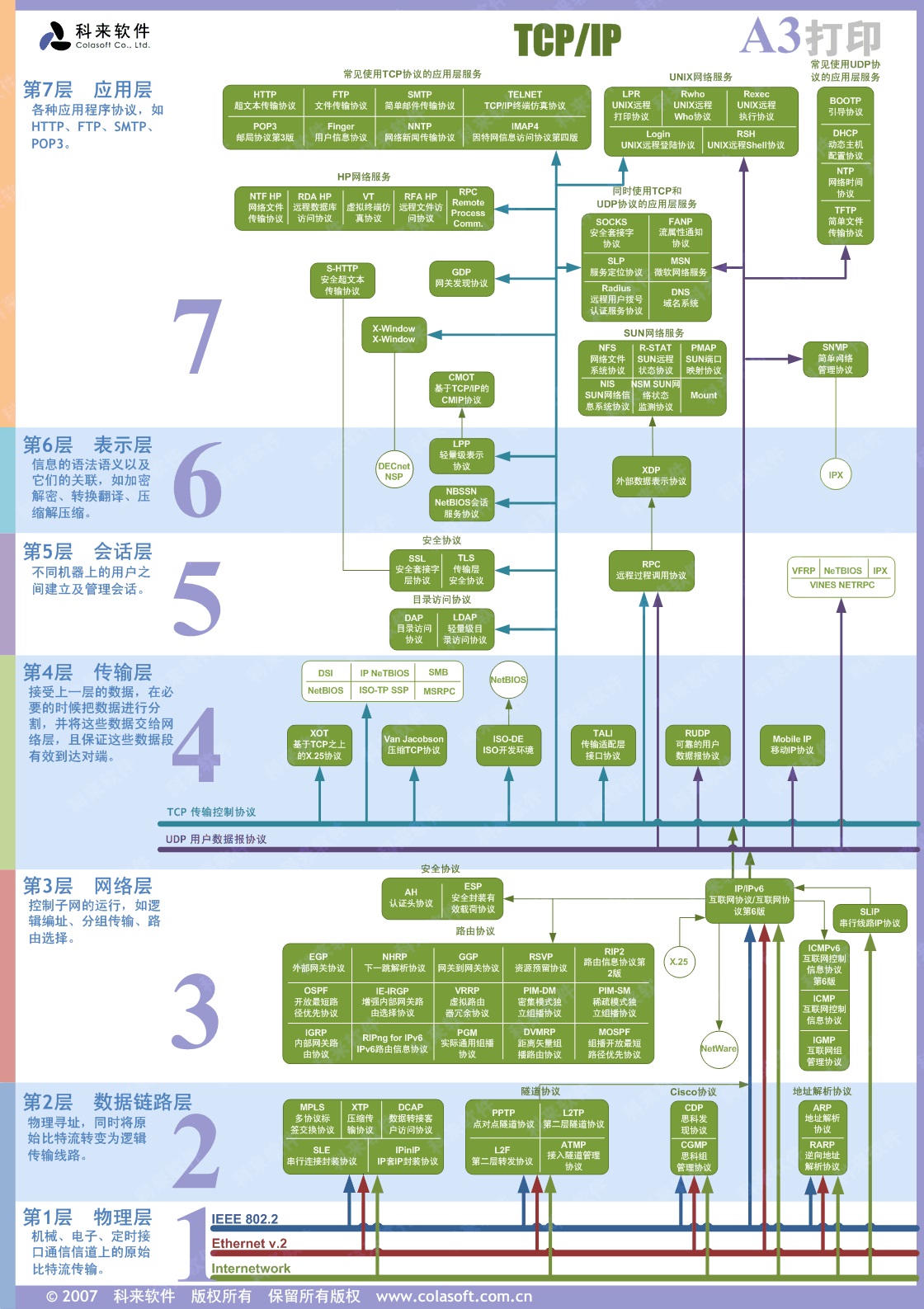
This diagram details the distribution of various protocols in the TCP/IP protocol suite within the OSI model.